Security HUD
System Watchdog
×
Threads Scanned
-- / --
SYS. LOAD --%
AI SHIELD ACTIVE
DMCA Policy
×

📋 DMCA Compliance

This platform and community fully complies with the Digital Millennium Copyright Act (DMCA) and international copyright laws. We take all copyright protection seriously.

🛡️ Copyright Protection

If you believe a posted item belongs to you or violates your copyright, you may file a DMCA takedown request through our official channels. Upon receiving a valid claim, the infringing content will be removed within 24 hours.

What's new
×
Fiveguard

Answered Can i get some assistance

JohnnyXhimpo

Bronze Elite
Joined
Apr 25, 2022
Messages
18
Reaction score
4
Points
166
Location
Colorado
Sorry if this is not the proper place for this post. I'm new to the forum and am needing some assistance.
This is the error message that pops up upon opening 5M. Everything was synced and functional then i changed a billboard in Paleto and here we are.....
any help is appreciated, Thanks in advance

[Window Title]
FiveM

[Main Instruction]
Detected modified game files (packfile x64t.rpf).

[Content]
Found encryption type OPEN. Since you were using OpenIV, make sure you use the 'mods' folder to place your modified files.

Currently, the installation directory D:\SteamLibrary\steamapps\common\Grand Theft Auto V\ is being used.

Please verify your game files, see for more information on doing so.

[^] Hide details [Save information] [Close]

[Expanded Information]
Report ID: ' '
 
Solution
Zan1456

Zan1456, thank you for providing the solution.

Sorry if this is not the proper place for this post. I'm new to the forum and am needing some assistance.
This is the error message that pops up upon opening 5M. Everything was synced and functional then i changed a billboard in Paleto and here we are.....
any help is appreciated, Thanks in advance

[Window Title]
FiveM

[Main Instruction]
Detected modified game files (packfile x64t.rpf).

[Content]
Found encryption type OPEN. Since you were using OpenIV, make sure you use the 'mods' folder to place your modified files.

Currently, the installation directory D:\SteamLibrary\steamapps\common\Grand Theft Auto V\ is being used.

Please verify your game files, see

Zan1456

Zan#1456
VIP
Joined
Mar 19, 2021
Messages
786
Solutions
5
Reaction score
88,221
Points
421
Location
Hungary
Website
vfivem.com
Sorry if this is not the proper place for this post. I'm new to the forum and am needing some assistance.
This is the error message that pops up upon opening 5M. Everything was synced and functional then i changed a billboard in Paleto and here we are.....
any help is appreciated, Thanks in advance

[Window Title]
FiveM

[Main Instruction]
Detected modified game files (packfile x64t.rpf).

[Content]
Found encryption type OPEN. Since you were using OpenIV, make sure you use the 'mods' folder to place your modified files.

Currently, the installation directory D:\SteamLibrary\steamapps\common\Grand Theft Auto V\ is being used.

Please verify your game files, see for more information on doing so.

[^] Hide details [Save information] [Close]

[Expanded Information]
Report ID: ' '
Moved to Questions
 

Zan1456

Zan#1456
VIP
Joined
Mar 19, 2021
Messages
786
Solutions
5
Reaction score
88,221
Points
421
Location
Hungary
Website
vfivem.com
Sorry if this is not the proper place for this post. I'm new to the forum and am needing some assistance.
This is the error message that pops up upon opening 5M. Everything was synced and functional then i changed a billboard in Paleto and here we are.....
any help is appreciated, Thanks in advance

[Window Title]
FiveM

[Main Instruction]
Detected modified game files (packfile x64t.rpf).

[Content]
Found encryption type OPEN. Since you were using OpenIV, make sure you use the 'mods' folder to place your modified files.

Currently, the installation directory D:\SteamLibrary\steamapps\common\Grand Theft Auto V\ is being used.

Please verify your game files, see for more information on doing so.

[^] Hide details [Save information] [Close]

[Expanded Information]
Report ID: ' '
This can be fixed by checking the game files.

  1. Load Steam.
  2. From the Library section, right-click on the game and select Properties from the menu.
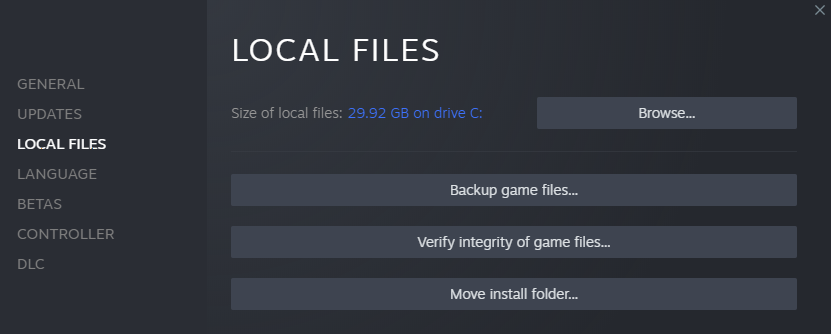
  3. Select the Local files tab and click Verify integrity of game files...
    Steam_VerifyFiles_EN.png
  4. Steam will verify the game's files. This process may take several minutes.
  5. Once the process is completed, the Check Window will automatically exit.
Often times, verifying your game files may resolve installation corruption that prevents you from being able to play your game.

To verify the installation of game files, navigate to the game in your Library and click on the three dots.

1582909953502-Ikc.png

Once open, click Verify in the drop-down navigation.

1582909969564-XjE.png


Depending on the size of the game it may take a few minutes to verify all your files. Once it completes click Launch to start your game.
1652811413285.png

1652811428974.png

1652811440018.png
 
Solution

JohnnyXhimpo

Bronze Elite
Joined
Apr 25, 2022
Messages
18
Reaction score
4
Points
166
Location
Colorado
This can be fixed by checking the game files.

  1. Load Steam.
  2. From the Library section, right-click on the game and select Properties from the menu.
  3. Select the Local files tab and click Verify integrity of game files...
    Steam_VerifyFiles_EN.png
  4. Steam will verify the game's files. This process may take several minutes.
  5. Once the process is completed, the Check Window will automatically exit.
Often times, verifying your game files may resolve installation corruption that prevents you from being able to play your game.

To verify the installation of game files, navigate to the game in your Library and click on the three dots.

1582909953502-Ikc.png

Once open, click Verify in the drop-down navigation.

1582909969564-XjE.png


Depending on the size of the game it may take a few minutes to verify all your files. Once it completes click Launch to start your game.
 
Top