


AmaiYoru
Gold Elite
UPDATE
Design & Function
# Event Announcement Management
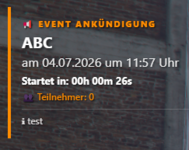
A sophisticated, minimalist event announcement system for FiveM (compatible with ESX and QBCore). The script allows administrators to schedule events via an in-game dashboard. Players see a floating visual display featuring a live countdown, automatic participant tracking, and integrated faction dispatch.
## Features
### Visual Integration & HUD
* **Minimalist Design:** The HUD avoids intrusive backgrounds or bulky floating boxes; it sits unobtrusively in the top-left corner of the screen.
* **Color Customization:** The primary color can be adjusted in the configuration file.
* **Global Notes:** Optional display of additional rules or equipment restrictions directly beneath the timer.
### Timing & Audio
* **Live Countdown:** Precise, second-by-second calculation of the time remaining until the event starts, based on date and time.
* **Duration Tracking:** Once the countdown ends, the display automatically switches to show the event's active duration.
* **Audio Signal:** An audible signal plays automatically for all relevant players exactly when the event begins.
### Dimension Protection & Participant Counter
* **Live Participant Counter:** The server checks routing bucket IDs every second and displays the current player count for the event dimension in the HUD.
* **Automatic Hiding:** If a player joins the configured event dimension, the HUD automatically hides itself to keep the screen free of overlays; it reappears when the player leaves the dimension.
* **Flexible Command Names:** Command names can be freely customized in the config to avoid conflicts with other server scripts.
### Security & Performance (Anti-Cheat)
* **Server-Side Exploit Protection:** Server triggers are fully secured. If a cheater or modder attempts to trigger the events via an external executor without administrative rights, the script blocks the action and raises an alarm in all consoles.
### Advanced Admin & Console Logging (Dual Logging)
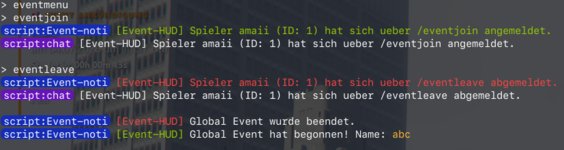
All administrative actions and errors are simultaneously output to the **server terminal (txAdmin/CMD)** and displayed—color-coded—in the **in-game console (F8)** for all staff members:
* **Start Monitoring:** Logs which administrator (name & ID) started a specific event.
* **External Termination Alert:** Detects and logs instances where Admin B closes an event originally started by Admin A (`[Event-HUD] EXTERNAL TERMINATION: ...`).
* **Abuse Log:** Flags errors in red if a player attempts to join an event when none is active, or tries to sign out without having signed in.
* **Audible F8 Feedback:** Plays a subtle alert sound for the server team upon administrative errors or exploit warnings, ensuring logs aren't missed amidst rapid text scrolling.
### Interactions & Faction Integration
* **ox_target Compatibility:** Optional registration of global player options to access the Discord event link or locally hide the HUD. Fully disableable via configuration.
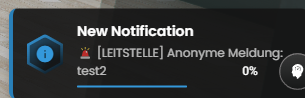
* **Automated Dispatch:** Optional transmission of an anonymous dispatch call to all PD/MD units exactly when the event starts. The dispatch includes the creator's coordinates and the text defined in the admin menu.
---
## Administration (In-Game Dashboard)
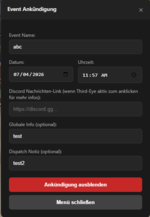
Authorized groups can access the control menu using the `/eventmenu` command. The dashboard features a three-button control system:
1. **Show Announcement:** Validates input fields (including HTML5 calendar selection) and activates the HUD server-wide. The admin menu remains open for any necessary adjustments. 2. **Hide announcement:** Ends the active event globally and removes the HUD from the screens of all players, including late joiners.
3. **Close menu:** Closes the input window and releases NUI focus, while the announcement remains active for the players.
---
## Configuration (config.lua)
The script is controlled centrally via `config.lua`:
* `Config.Language`: Language setting for localization (`de` / `en`).
* `Config.ErlaubteGruppen`: Definition of administrative framework ranks for accessing the `/eventmenu`.
* `Config.UseOxTarget`: Toggle (`true`/`false`) to enable or disable the `ox_target` interface.
* **`Config.HUD.HauptFarbe`:** Changes the accent color of the entire system (HUD borders, participant text, and activation button).
* **`Config.JoinCommand` / `Config.LeaveCommand`:** Defines the in-game commands for players (default: `/eventjoin` and `/eventleave`).
* **`Config.NotifyScript`:** Supports notifications for `ox_lib`, `esx`, `qb`, or the standard `chat`.
* **`Config.ShowNotes`:** Toggles global text notes in the player HUD on or off.
---
## Installation
1. Copy the resource folder into your `resources/` directory.
2. Enter your Discord webhook in the first line of `server.lua`.
3. Adjust the groups and settings in `config.lua` to match your server framework.
4. Add `ensure [folder_name]` to your `server.cfg`.
## Dependencies
* `es_extended` OR `qb-core` (optional for permission checks and dispatch)
* `ox_target` (optional for link interactions)
Design & Function
# Event Announcement Management
A sophisticated, minimalist event announcement system for FiveM (compatible with ESX and QBCore). The script allows administrators to schedule events via an in-game dashboard. Players see a floating visual display featuring a live countdown, automatic participant tracking, and integrated faction dispatch.
## Features
### Visual Integration & HUD
* **Minimalist Design:** The HUD avoids intrusive backgrounds or bulky floating boxes; it sits unobtrusively in the top-left corner of the screen.
* **Color Customization:** The primary color can be adjusted in the configuration file.
* **Global Notes:** Optional display of additional rules or equipment restrictions directly beneath the timer.
### Timing & Audio
* **Live Countdown:** Precise, second-by-second calculation of the time remaining until the event starts, based on date and time.
* **Duration Tracking:** Once the countdown ends, the display automatically switches to show the event's active duration.
* **Audio Signal:** An audible signal plays automatically for all relevant players exactly when the event begins.
### Dimension Protection & Participant Counter
* **Live Participant Counter:** The server checks routing bucket IDs every second and displays the current player count for the event dimension in the HUD.
* **Automatic Hiding:** If a player joins the configured event dimension, the HUD automatically hides itself to keep the screen free of overlays; it reappears when the player leaves the dimension.
* **Flexible Command Names:** Command names can be freely customized in the config to avoid conflicts with other server scripts.
### Security & Performance (Anti-Cheat)
* **Server-Side Exploit Protection:** Server triggers are fully secured. If a cheater or modder attempts to trigger the events via an external executor without administrative rights, the script blocks the action and raises an alarm in all consoles.
### Advanced Admin & Console Logging (Dual Logging)
All administrative actions and errors are simultaneously output to the **server terminal (txAdmin/CMD)** and displayed—color-coded—in the **in-game console (F8)** for all staff members:
* **Start Monitoring:** Logs which administrator (name & ID) started a specific event.
* **External Termination Alert:** Detects and logs instances where Admin B closes an event originally started by Admin A (`[Event-HUD] EXTERNAL TERMINATION: ...`).
* **Abuse Log:** Flags errors in red if a player attempts to join an event when none is active, or tries to sign out without having signed in.
* **Audible F8 Feedback:** Plays a subtle alert sound for the server team upon administrative errors or exploit warnings, ensuring logs aren't missed amidst rapid text scrolling.
### Interactions & Faction Integration
* **ox_target Compatibility:** Optional registration of global player options to access the Discord event link or locally hide the HUD. Fully disableable via configuration.
* **Automated Dispatch:** Optional transmission of an anonymous dispatch call to all PD/MD units exactly when the event starts. The dispatch includes the creator's coordinates and the text defined in the admin menu.
---
## Administration (In-Game Dashboard)
Authorized groups can access the control menu using the `/eventmenu` command. The dashboard features a three-button control system:
1. **Show Announcement:** Validates input fields (including HTML5 calendar selection) and activates the HUD server-wide. The admin menu remains open for any necessary adjustments. 2. **Hide announcement:** Ends the active event globally and removes the HUD from the screens of all players, including late joiners.
3. **Close menu:** Closes the input window and releases NUI focus, while the announcement remains active for the players.
---
## Configuration (config.lua)
The script is controlled centrally via `config.lua`:
* `Config.Language`: Language setting for localization (`de` / `en`).
* `Config.ErlaubteGruppen`: Definition of administrative framework ranks for accessing the `/eventmenu`.
* `Config.UseOxTarget`: Toggle (`true`/`false`) to enable or disable the `ox_target` interface.
* **`Config.HUD.HauptFarbe`:** Changes the accent color of the entire system (HUD borders, participant text, and activation button).
* **`Config.JoinCommand` / `Config.LeaveCommand`:** Defines the in-game commands for players (default: `/eventjoin` and `/eventleave`).
* **`Config.NotifyScript`:** Supports notifications for `ox_lib`, `esx`, `qb`, or the standard `chat`.
* **`Config.ShowNotes`:** Toggles global text notes in the player HUD on or off.
---
## Installation
1. Copy the resource folder into your `resources/` directory.
2. Enter your Discord webhook in the first line of `server.lua`.
3. Adjust the groups and settings in `config.lua` to match your server framework.
4. Add `ensure [folder_name]` to your `server.cfg`.
## Dependencies
* `es_extended` OR `qb-core` (optional for permission checks and dispatch)
* `ox_target` (optional for link interactions)
Attachments
Last edited: