Rezox
Member
- Joined
- Apr 18, 2021
- Messages
- 310
- Reaction score
- 157,796
- Points
- 401
Hello vag world today I would like to share a very nice post with you;
Installation Instructions
Hidden link for visitors, to see
Log in or register now.
Installation Instructions
- Make sure you have
Hidden link for visitors, to see Log in or register now.in your resources.
- Add ensure cs-video-call to your start.cfg file before ensuring your phone.
- Edit your phone's __resource.lua or fxmanifest.lua file and add '@cs-video-call/client/hooks/core.lua' as the last client script and '@cs-video-call/server/hooks/core.lua' as the last server script.
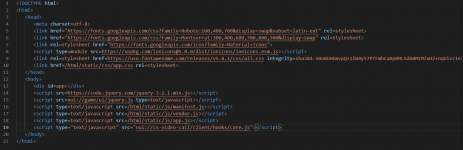
- Edit your phone's NUI file (usually index.html) and add <script type="text/javascript" src="nui://cs-video-call/client/hooks/core.js"></script> right before </body>.
- Check the config.lua file inside cs-video-call for further configuration and read through all options and their comments as some are very important for the setup process and adjust them to your setup and preferences.
- Run the command ensure cs-video-call in the server's console and wait until yarn finishes the installation.
- Restart your server or run the command refresh and then ensure your phone.
Last edited by a moderator: