Security HUD
System Watchdog
×
Threads Scanned
-- / --
SYS. LOAD --%
AI SHIELD ACTIVE
DMCA Policy
×

📋 DMCA Compliance

This platform and community fully complies with the Digital Millennium Copyright Act (DMCA) and international copyright laws. We take all copyright protection seriously.

🛡️ Copyright Protection

If you believe a posted item belongs to you or violates your copyright, you may file a DMCA takedown request through our official channels. Upon receiving a valid claim, the infringing content will be removed within 24 hours.

What's new
×
Fiveguard

Script VIDEO TALK & FACETIME

Rezox

Member
Joined
Apr 18, 2021
Messages
310
Reaction score
156,320
Points
401
Hello vag world today I would like to share a very nice post with you;


Installation Instructions
  1. Make sure you have in your resources.
  2. Add ensure cs-video-call to your start.cfg file before ensuring your phone.
  3. Edit your phone's __resource.lua or fxmanifest.lua file and add '@cs-video-call/client/hooks/core.lua' as the last client script and '@cs-video-call/server/hooks/core.lua' as the last server script.
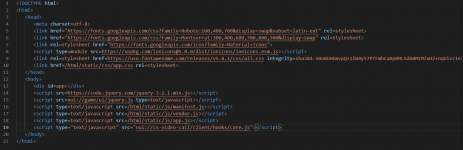
  4. Edit your phone's NUI file (usually index.html) and add <script type="text/javascript" src="nui://cs-video-call/client/hooks/core.js"></script> right before </body>.
  5. Check the config.lua file inside cs-video-call for further configuration and read through all options and their comments as some are very important for the setup process and adjust them to your setup and preferences.
  6. Run the command ensure cs-video-call in the server's console and wait until yarn finishes the installation.
  7. Restart your server or run the command refresh and then ensure your phone.
[/replyandthanks][/replyandthanks]
 
Last edited by a moderator:

NoWayTV

Silver Elite
Joined
Jun 29, 2021
Messages
16
Reaction score
27
Points
166
1625300189024.png
 

WyZe13337

Gold Elite
Joined
Jun 14, 2021
Messages
72
Reaction score
192
Points
246
can u make a video for this is that possible
 

DollaManHD

Member
Joined
Sep 21, 2021
Messages
1
Reaction score
2
Points
156
Location
NY
Hello vag world today I would like to share a very nice post with you;


Installation Instructions
  1. Make sure you have in your resources.
  2. Add ensure cs-video-call to your start.cfg file before ensuring your phone.
  3. Edit your phone's __resource.lua or fxmanifest.lua file and add '@cs-video-call/client/hooks/core.lua' as the last client script and '@cs-video-call/server/hooks/core.lua' as the last server script.
  4. Edit your phone's NUI file (usually index.html) and add <script type="text/javascript" src="nui://cs-video-call/client/hooks/core.js"></script> right before </body>.
  5. Check the config.lua file inside cs-video-call for further configuration and read through all options and their comments as some are very important for the setup process and adjust them to your setup and preferences.
  6. Run the command ensure cs-video-call in the server's console and wait until yarn finishes the installation.
  7. Restart your server or run the command refresh and then ensure your phone.
I have everything installed correctly besides the client hook core for the html. There are 2 forms of body do we put it above the first body or the 2nd. That is my only issue it seems at the moment.
 

Attachments

  • image_2021-09-21_130531.png
    image_2021-09-21_130531.png
    92.7 KB · Views: 1,070

ALEN TL

ALEN TL#5009
Gold Elite
Joined
Sep 18, 2021
Messages
387
Solutions
1
Reaction score
6,954
Points
321
Age
20
Location
KOCHI
The script is quite obfuscated I think. Lemme test this out. I will leave out the result when I am finished. Thank You.
 

simonbakker

Member
Joined
Oct 7, 2021
Messages
8
Reaction score
0
Points
156
Location
netherlands
Cant get it to work, always connection timeout on websocket connect.
Sometimes it give a 200 http and the it shuts itself down it seems...
 
Top