dattneleuleu
Bronze Elite
Sorry I am blind. lol. This is Latest 2026-4-23
lol im stuck in here 2hours do you have .rar file
 )
)This platform and community fully complies with the Digital Millennium Copyright Act (DMCA) and international copyright laws. We take all copyright protection seriously.
If you believe a posted item belongs to you or violates your copyright, you may file a DMCA takedown request through our official channels. Upon receiving a valid claim, the infringing content will be removed within 24 hours.


Sorry I am blind. lol. This is Latest 2026-4-23
)Same bro

we need find direct link , torrent download too slow 1kb/sSame bro


tks you the best , do you have quantv reshade preset ?I thought I had posted here, must've been another thread. Are all you guys wanting FiveM?


What is this a tool?I have also created NEW install guides to replace the old, shitty outdated ones. These have Drop-down ribbons that include more details, hyperlinks and just overall a nice appearance. I also downloaded the required "Basemod altV" and "BasemodE" files and put them in the step 1 folder to make it easier (Though I might take those out if I want to include the .rar/.zip files in the comments for direct access.
View attachment 47344
View attachment 47345
View attachment 47346
View attachment 47347
View attachment 47348
No, it's a readmeWhat is this a tool?

theres this error saying "missing depedenciesAll variations of QuantV (Latest 2026-4-23) are here. Unzip all parts into the same folder location. The Url for the basebod for both AltV and SP Enhanced is included if you need it. Otherwise if you have the previous QuantV version with basemod already installed, you won't need it.
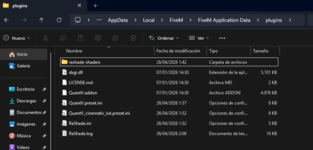
If you're just updating your QuantV, copy contents of Part 2, the folder with the QuantV.addon file into your root directory. The .addon file is the actual mod update.
The optional scripthook reshade compatibility "dxgi.asi" file is meant to replace your d3d12.dll file (make sure you read the ReadME, though it's a little out of date) for the mod requirements. Rename that d3d12.dll to "d3d12.dll.bak" , and move the dxgi.asi into your root.


yeahDid you download the basemod?
same goes for sp everything was downloadedDid you download the basemod?
yeah
same goes for sp everything was downloaded
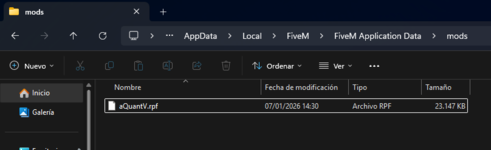
Hmmm no. I have the aQuantV.rpf file in the mods folder as indicatedView attachment 47400
"Part1: · Drag and drop the file aQuantV.rpf in the folder: /FiveM/mods/"
You have aQuantV.rpf in the wrong folder
Thank you for taking the time to help me. I know it's very easy to do; I've used the mod before, but for some reason, the addon isn't working with this updated QuantV.addon file. The addon box in the ReShade menu's addons tab remains unchecked, as you can see in the image I sent earlier. However, if I use an older QuantV.addon file, the mod does work, although it displays the message "New Update QuantV available."Here, take a look at this really quick
I Pm'd ya.Thank you for taking the time to help me. I know it's very easy to do; I've used the mod before, but for some reason, the addon isn't working with this updated QuantV.addon file. The addon box in the ReShade menu's addons tab remains unchecked, as you can see in the image I sent earlier. However, if I use an older QuantV.addon file, the mod does work, although it displays the message "New Update QuantV available."
Tomorrow I'll try ignoring the License.md file and not adding it, as you show in the video you sent, to see what happens. But I think the problem has something to do with the QuantV.addon file in this latest version.
hey i've tried them all, however it still won;t work same as mata, i use older quantV it works fine but when i'm about to try the latest one it just wouldn't work maybe some files are missingPart1. Install BaseMod.oiv with OpenIV, when asked select mods folder.
Part2. Install QuantV_Install.oiv with OpenIV (mods folder).
Optionals: Once the main mod is installed (Part1+Part2) you may install any optional preset.
*Remember to disable Battleye if you didn't yet. (or use the command -nobattleye)
Requirements
· Ingame settings: DirectX11, ShaderQuality & PostFX maxed.
· OpenIV to install *.oiv packages.
· ScriptHookV to use Trainer (and mods folder in SP).
· ReShade with Addon support.