Security HUD
System Watchdog
×
Threads Scanned
-- / --
SYS. LOAD --%
AI SHIELD ACTIVE
DMCA Policy
×

📋 DMCA Compliance

This platform and community fully complies with the Digital Millennium Copyright Act (DMCA) and international copyright laws. We take all copyright protection seriously.

🛡️ Copyright Protection

If you believe a posted item belongs to you or violates your copyright, you may file a DMCA takedown request through our official channels. Upon receiving a valid claim, the infringing content will be removed within 24 hours.

What's new

MODS Blueline realism & Blueline dispatch 4.3

bytrix_x

Silver Elite
Joined
Sep 28, 2025
Messages
19
Reaction score
36
Points
161
Location
Chile

1785541535433.png

Speak naturally. Dispatch gets it.​

BlueLine Realism is a next-generation voice dispatch mod for LSPDFR. Hold your PTT (push-to-talk key), speak naturally into the mic, and the radio responds: backup, EMS, fire, tow, air, pursuits, status, and more, without clicking through menus or memorizing rigid command phrases.

Under the hood, BLR uses a powerful AI intent-driven system paired with highly accurate speech recognition, so you can say things the way you'd say them on a real shift. Ask for a unit. Clear the scene. Start or end patrol. Call a medevac. Run a plate. Request a supervisor. The mod listens for what you meant, not just a fixed keyword list.

This is radio immersion built for people who want to stay in character.

Note: BLR requires a free third-party API key and an active internet connection to run. Full setup is covered step by step in the video.

You don't have permission to view content!


BLUELINE REALISM 0.9.7:
You don't have permission to view content!


BLUELINE DISPATCH:
You don't have permission to view content!


DO NOT INSTALL THE ATTACHED FILE, DOWNLOAD THESE ↑↑↑↑↑↑↑↑↑↑↑↑↑↑↑↑↑↑↑↑↑↑↑↑↑↑↑↑↑↑↑↑↑↑↑↑↑↑↑↑↑↑↑↑↑↑↑↑↑↑↑↑↑↑↑↑↑↑v
 
Last edited:

burncoldy

Member
Joined
Oct 12, 2022
Messages
2
Reaction score
2
Points
146
Location
sweden
Thanks, you are the best. Works flawlessly.
Do you gave the small update for BLR 0.9.1?
 
Last edited:

Agent47

Bronze Elite
Joined
May 28, 2026
Messages
8
Reaction score
2
Points
41
Location
NPC
I’m having trouble repositioning the widgets in edit mode (BLR). When I click on any of the blue boxes, I can’t drag them at all. Any idea why?
 

LethalKskn

Member
Joined
Aug 15, 2026
Messages
1
Reaction score
1
Points
16
Location
Turkey

View attachment 49091

where is the BlueLine_Realism.ini? thats file missing?​

Speak naturally. Dispatch gets it.​

BlueLine Realism is a next-generation voice dispatch mod for LSPDFR. Hold your PTT (push-to-talk key), speak naturally into the mic, and the radio responds: backup, EMS, fire, tow, air, pursuits, status, and more, without clicking through menus or memorizing rigid command phrases.

Under the hood, BLR uses a powerful AI intent-driven system paired with highly accurate speech recognition, so you can say things the way you'd say them on a real shift. Ask for a unit. Clear the scene. Start or end patrol. Call a medevac. Run a plate. Request a supervisor. The mod listens for what you meant, not just a fixed keyword list.

This is radio immersion built for people who want to stay in character.

Note: BLR requires a free third-party API key and an active internet connection to run. Full setup is covered step by step in the video.

You don't have permission to view content!


BLUELINE REALISM 0.9.6:
You don't have permission to view content!


BLUELINE DISPATCH:
You don't have permission to view content!


DO NOT INSTALL THE ATTACHED FILE, DOWNLOAD THESE ↑↑↑↑↑↑↑↑↑↑↑↑↑↑↑↑↑↑↑↑↑↑↑↑↑↑↑↑↑↑↑↑↑↑↑↑↑↑↑↑↑↑↑↑↑↑↑↑↑↑↑↑↑↑↑↑↑↑v
 

jacobmehmed

Member
Joined
Aug 14, 2026
Messages
4
Reaction score
0
Points
16
Location
Indonesia
There's no ini file, it will create itself once you launch lspdfr with BLR + People have to stop complaining and blaming me for these kinds of things when yall should blame Blueline Vibes
can u teach me how to the installations please? or anyone can do?
 

Agent47

Bronze Elite
Joined
May 28, 2026
Messages
8
Reaction score
2
Points
41
Location
NPC
can u teach me how to the installations please? or anyone can do?
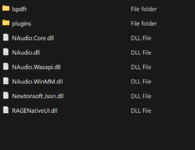
drag and drop into your main GTAV folder. (PC only) not for console.
 

Attachments

  • Drag and drop GTAV foldr.png
    Drag and drop GTAV foldr.png
    25.7 KB · Views: 24

jacobmehmed

Member
Joined
Aug 14, 2026
Messages
4
Reaction score
0
Points
16
Location
Indonesia
drag and drop into your main GTAV folder. (PC only) not for console.a
i appriciated buddy, and than could i deleted the grammar police + all files tough?
and whats other the important way should be considered while installing this? thankyou
 

Agent47

Bronze Elite
Joined
May 28, 2026
Messages
8
Reaction score
2
Points
41
Location
NPC
i appriciated buddy, and than could i deleted the grammar police + all files tough?
and whats other the important way should be considered while installing this? thankyou
Yes, delete GrammarPolice and all files that come with it. Keep only RAGENativeUI and CalloutInterfaceAPI.dll.
  • Delete the Textures files from OpenIV.
  • Go to Plugins > LSPDFR and delete the GrammarPolice folder and its .dll.
  • The audio files in the LSPDFR folder can stay—they won’t hurt your game.
  • Drag and drop is the only way to install it.
 
Last edited:

Kximz41

Member
Joined
Aug 19, 2026
Messages
1
Reaction score
0
Points
16
Location
America
i got an problem which I already installed the realism and put the 2 api keys on the configuration settings of realism, but still doesnt work. (I edited the ptt to 0). I tried holding the 0 but it doesnt work.
 
Top