Hidden link for visitors, to see
Log in or register now.
Hidden link for visitors, to see
Log in or register now.
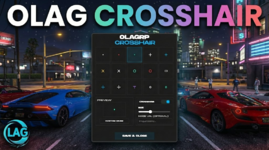
 0LAG Crosshair System: Redefine Your Precision
The most advanced, standalone aiming solution for FiveM.Stop relying on external software or third-party overlays. The 0LAG Crosshair System provides a fully integrated, high-performance UI that gives your players complete control over their accuracy. Built with a sleek "Monument Extended" aesthetic and optimized for zero latency, this resource is designed to blend seamlessly into any modern server environment.
 Key Features
 In-Game Pixel Editor (Draw Mode)
Why settle for generic designs? Our exclusive Custom Draw Mode puts a 32x32 pixel canvas directly into the player's hands.- Full Creative Control: Draw your unique crosshair pixel-by-pixel inside the game.
- Complete Toolkit: Includes a Pen, Eraser, Clear Canvas, and a dynamic RGB Color Picker.
- Instant Application: Draw it, save it, and use it immediately.
 Limitless Customization
- 15+ Professional Presets: Includes tactical dots, crosses, T-shapes, circles, and brackets.
- External Image Support: Have a favorite crosshair? Simply paste an image URL (Imgur, Discord, etc.), and the system renders it instantly.
- Precision Scaling: A responsive slider allows players to adjust the size from 10px to 100px, ensuring perfect visibility on any resolution.
 Intelligent Performance (0LAG)
True to its name, this system is optimized for maximum frame rates.- Zero Resmon: Optimized loops ensure the script runs at 0.00ms when idle.
- Smart Visibility: The crosshair automatically hides when the player opens the Pause Menu or interacts with NUI elements (inventory, phone, etc.).
- KVP Persistence: Using the native Key-Value Pair system, players only need to set their crosshair once. It saves locally and auto-loads every time they join the server.
 Server-Side Configuration
We’ve made it easy for server owners to brand the experience.- Custom Branding: Change the Server Name displayed in the UI directly via the config.
- Theme Integration: Adjust the Main Color (HEX) to match your server’s HUD or branding identity.
- Localization: Fully translated and ready to go with built-in support for English (EN) and Turkish (TR).
 Technical Specifications
- Framework: Standalone (Works with ESX, QBCore, or No Framework).
- UI Stack: HTML5, CSS3, Vanilla JS (No heavy libraries like Vue/React).
- Saving: Native SetResourceKvp (No database required).
- Resmon: 0.00ms (Idle) / 0.01ms (Active).
 How to Use
- Type /crosshair to open the modern UI panel.
- Select a preset, paste a URL, or draw your own design.
- Adjust the size and color to your liking.
- Click SAVE & CLOSE—your settings are now permanent