


Hello everyone, dear VAG WORLD users,
Today I wanted to share with you a nice plugin/script that you can use in demonstration planes. There are separate files for OneSync servers and separate files for Normal servers. If you install the Normal script on the OneSync server, it will not work. Likewise, if you install the OneSync version of the script on a Normal, Licenseless server, it will not work. In other words, download and install the appropriate file according to the type of your server. In the OneSync version of the script, sync works with all players, that is, all players in the region see the colored smoke and work in sync.
For OneSync servers;
For regular servers;
Setup;
We start the script by typing start planesmokeOneSync into server.cfg. In the same way, you will use the version of the script for normal servers, we start by typing start planesmoke.
For the OneSync version of the script, you can change the on/off button by
For the Normal version of the script, you can change the on/off key from the
Setup;
For OneSync servers, the Smoke on/off key is Num-. Likewise for normal servers it is the Z key.
/smokecolor <255> <0> <0> You need to give 3 parameters to set the color of the smoke in RGB format. (Sample color: Red)
You need to give parameter /smokesize <0.6> or <2> to adjust the size of the smoke both in decimal and normal way.


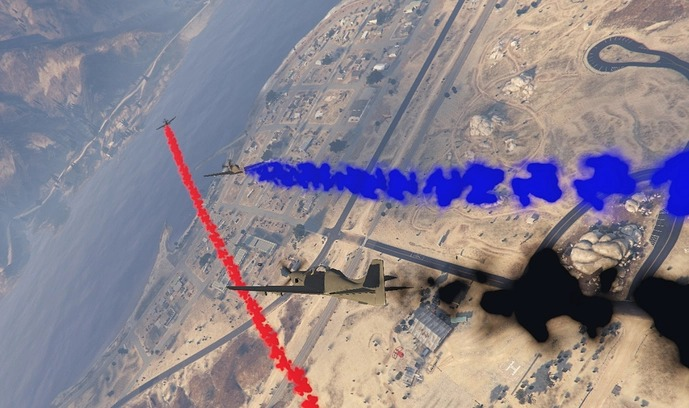



Today I wanted to share with you a nice plugin/script that you can use in demonstration planes. There are separate files for OneSync servers and separate files for Normal servers. If you install the Normal script on the OneSync server, it will not work. Likewise, if you install the OneSync version of the script on a Normal, Licenseless server, it will not work. In other words, download and install the appropriate file according to the type of your server. In the OneSync version of the script, sync works with all players, that is, all players in the region see the colored smoke and work in sync.
For OneSync servers;
For regular servers;
Setup;
We start the script by typing start planesmokeOneSync into server.cfg. In the same way, you will use the version of the script for normal servers, we start by typing start planesmoke.
For the OneSync version of the script, you can change the on/off button by
For the Normal version of the script, you can change the on/off key from the
Setup;
For OneSync servers, the Smoke on/off key is Num-. Likewise for normal servers it is the Z key.
/smokecolor <255> <0> <0> You need to give 3 parameters to set the color of the smoke in RGB format. (Sample color: Red)
You need to give parameter /smokesize <0.6> or <2> to adjust the size of the smoke both in decimal and normal way.


