Force Burglary is an advanced, highly optimized house robbery system for FiveM servers, providing a comprehensive and immersive burglary experience with multi-framework support, modern React UI, XP progression, and dynamic NPC interactions.
Supports all major FiveM frameworks out of the box:
Force Burglary offers extensive configuration options:
ensure oxmysql
ensure ox_lib
ensure force-burglary
Detailed installation and configuration instructions are included in the resource documentation.
Complete documentation is provided covering:
This resource uses partial escrow protection:
This allows you to fully customize the resource to your server’s needs while protecting the core functionality.
Before setting up the resource, ensure you have the following dependencies installed:


Features
Complete Burglary System
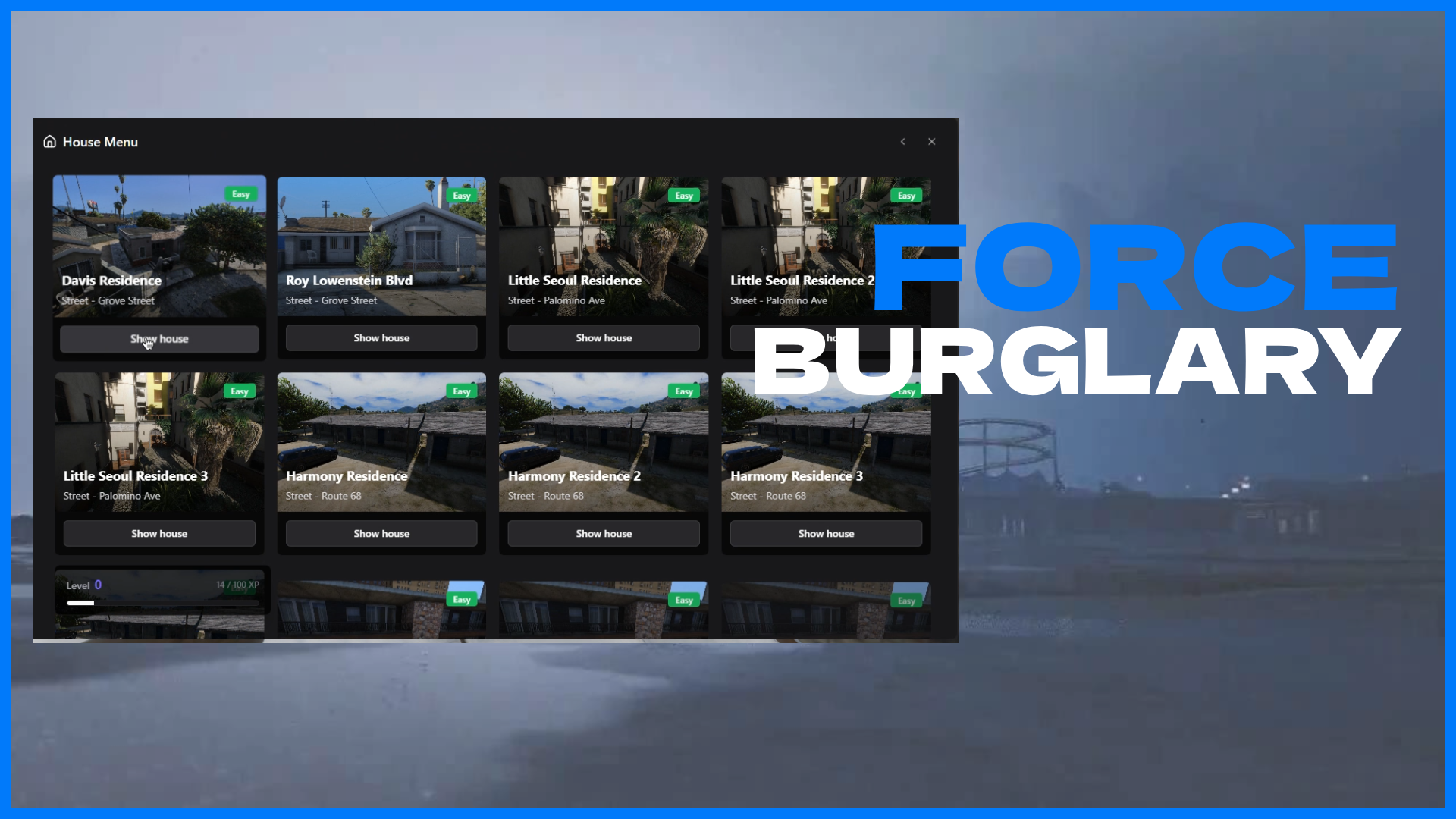
- 20+ pre-configured houses - Covering the entire San Andreas map with three difficulty tiers
- XP progression system - Level up to unlock more difficult heists with better rewards
- Dynamic difficulty scaling - Easy, medium, and hard houses with scaled loot and challenges
- Multiple entry methods - Lockpicking with mini-game or crowbar breach mechanics
- Cooldown system - Configurable per-house cooldowns to prevent farming
- Flexible requirements - Set police count, items, or XP requirements per house
Advanced Interior System
- Instanced interiors - Each robbery happens in a separate instance for privacy
- Multiple shell support - Compatible with qb-interior, force-interior, and custom shells
- Pre-configured loot points - Specific animations for looting different objects
- Dynamic interior loading - Async operations for smooth transitions
- Smart exit system - Leave robberies at any time without issues
Dynamic NPC Behavior
- Realistic daily schedules - NPCs have home hours and sleep schedules (configurable per house)
- Activity simulation - NPCs perform activities when awake (sitting, smoking, watching TV)
- Sleep detection - Sleeping NPCs won’t detect you immediately
- Wake mechanics - Make too much noise and wake the tenant
- Armed response - NPCs defend their homes with weapons when alerted
- Difficulty-based behavior - Different NPC aggression levels per difficulty tier
Stealth Mechanics
- Crouch system - Reduce noise generation by crouching
- Noise detection - Running, shooting, and breaking objects increases alert level
- Sound level indicator - Visual feedback showing current noise level in real-time
- Alarm system - Trigger house alarms if detection threshold is reached
- Police dispatch - Automatic dispatch alerts when alarms trigger or NPCs call police
Advanced Loot System
- Rarity-based loot - Common, rare, and epic item categories with different spawn chances
- Randomized spawns - Different items spawn each robbery attempt
- Difficulty-scaled rewards - Higher difficulty houses offer better loot pools
- Hundreds of items - Extensive configurable loot pools with spawn chances
- XP rewards - Gain experience for each item successfully looted
- Custom loot configuration - Easily add your own items and adjust spawn rates
Black Market System
- Dynamic NPC locations - Market dealer moves to different locations each day of the week
- Purchase tools - Buy lockpicks, advanced lockpicks, crowbars, sleep gas, and weapons
- Configurable inventory - Set exactly what items are available for purchase
- Custom pricing - Adjust individual item prices to match your economy
- Optional map blips - Choose whether to show market on map or keep it secret
- Modern UI - Beautiful React-based shopping interface
Pawnshop System
- Fence stolen goods - Sell items looted from houses to make profit
- Dynamic pricing - Configure custom sell prices for each item type
- Multiple locations - Set up multiple pawnshop locations across the map
- Daily location changes - Pawnshop NPC moves to different spots each day
- Inventory integration - Seamless integration with framework inventory systems
- Modern UI - Clean, intuitive interface for selling items
Police Integration
- Multiple dispatch systems - Supports qs-dispatch, core_dispatch, and custom integrations
- Automatic alerts - Dispatch sent when alarms trigger or NPCs alert authorities
- Configurable requirements - Set minimum police count required per house
- Response time scaling - Different police response times based on difficulty
- Blip duration control - Configure how long dispatch blips stay active
- Easy custom integration - Simple to integrate with any dispatch system
Multi-Framework Support
Supports all major FiveM frameworks out of the box:
- ESX - Full support for ESX framework (es_extended)
- QBCore - Complete QBCore integration (qb-core)
- QBox - Native QBox support (qbx_core)
- Custom frameworks - Easily adaptable to any custom framework
- Auto-detection - Automatically detects and configures for your framework
Admin Features
- Cooldown override - Admins can bypass house cooldown restrictions
- XP management - Add or remove player XP through commands
- ACE permission support - Use ACE permissions or identifier whitelist
- Debug mode - Comprehensive logging for troubleshooting issues
Developer Friendly
- Modular architecture - Clean code structure that’s easy to extend
- Custom framework support - Simple adaptation to any framework structure
- Custom dispatch integration - Easy to integrate your dispatch system
- Open config files - All configuration files are fully editable
- Comprehensive documentation - Detailed guides covering all features
System Requirements
Required Dependencies
- ox_lib - Core library for UI, callbacks, and utilities
- oxmysql - Database management
Optional Dependencies
- Interior shell resource - qb-interior, force-interior, or custom shells
- Dispatch system - qs-dispatch, core_dispatch, or custom
- Target system - ox_target or qb-target (recommended)
- Progress bar - ox_lib, qb-progress, esx_progressbar, or use built-in 3D text
Framework Compatibility
- ESX (Legacy & Modern)
- QBCore
- QBox
- Custom/Standalone (easily adaptable)
Configuration Highlights
Force Burglary offers extensive configuration options:
House Configuration
- 20+ pre-configured houses with coordinates across the map
- Per-house settings - Customize difficulty, requirements, cooldowns, and more
- Flexible entry methods - Configure lockpicking or crowbar requirements
- Custom requirements - Set item, police count, or XP requirements per house
Loot Configuration
- Custom loot pools - Define items with spawn chances and rarity tiers
- Difficulty-based distribution - Different loot pools for each difficulty level
- Rarity weights - Control distribution of common, rare, and epic items
- Hundreds of items - Pre-configured extensive loot pools
Interior Configuration
- Multiple shell support - Works with popular shell resources
- NPC tenant configuration - Define behavior, schedules, and activities per difficulty
- Loot point setup - Configure specific loot locations with animations
- Prop loot system - Attach loot to specific props in the interior
Difficulty Scaling
- Lockpick time - Adjust time required per difficulty level
- Loot time - Configure how long looting takes
- Noise multipliers - Control noise generation rates
- NPC aggression - Set different aggression levels per difficulty
- Police response time - Adjust how quickly police arrive
Market & Pawnshop
- Daily location rotation - Different NPC locations for each day of the week
- Custom item lists - Define what items can be bought or sold
- Dynamic pricing - Set individual prices for each item
- Optional blips - Choose whether to show locations on map
Installation
- Extract force-burglary to your resources folder
- Run the included SQL file to create necessary database tables
- Ensure dependencies are installed and started (ox_lib, oxmysql)
- Add to your server.cfg:
ensure oxmysql
ensure ox_lib
ensure force-burglary
- Configure settings in config/ files to match your server setup
- Restart your server
Detailed installation and configuration instructions are included in the resource documentation.
Documentation
Complete documentation is provided covering:
- Installation guide - Step-by-step setup instructions
- Configuration guide - Detailed explanation of all config options
- Usage & integration - All events, callbacks, and integration examples
- Custom framework integration - How to adapt to custom frameworks
- Custom dispatch integration - How to integrate your dispatch system
- Troubleshooting - Common issues and solutions
Escrow Information
This resource uses partial escrow protection:
Open Source (Editable)
- All configuration files (config/*.lua)
- Localization files (locales/*.json)
- Custom framework integration (client/custom/frameworks/*.lua, server/custom/frameworks/*.lua)
- Custom dispatch integration (client/custom/dispatch.lua)
- Custom progress bar integration (client/custom/progressbar.lua)
- Custom target integration (client/custom/target.lua)
- Custom lockpick integration (client/custom/lockpick.lua)
Protected (Escrow)
- Core client scripts
- Core server scripts
- UI/NUI files
This allows you to fully customize the resource to your server’s needs while protecting the core functionality.
 Prerequisites
Before setting up the resource, ensure you have the following dependencies installed:
- ox_lib (Required) - Core library for base functions
- GitHub:
Hidden link for visitors, to see Log in or register now.
- Documentation:
Hidden link for visitors, to see Log in or register now.
- oxmysql (Required) - Database queries
- GitHub:
Hidden link for visitors, to see Log in or register now.
- Documentation:
Hidden link for visitors, to see Log in or register now.
 Download & Links
Hidden link for visitors, to see
Log in or register now.
Hidden link for visitors, to see
Log in or register now.
Hidden link for visitors, to see
Log in or register now.
Hidden link for visitors, to see
Log in or register now.