


norteeeeeeeHola mundo vag hoy me gustaría compartir con ustedes un post muy bonito;
*** Texto oculto: no se puede citar. ***
*** Texto oculto: no se puede citar. ***
*** Texto oculto: no se puede citar. ***
Hidden link for visitors, to see Log in or register now.
Instrucciones de instalación
[/respuestaygracias][/respuestaygracias]
- Asegúrate de tener
Hidden link for visitors, to see Log in or register now.en tus recursos.- Agregue asegurar cs-video-llamada a su archivo start.cfg antes de asegurar su teléfono.
- Edite el archivo __resource.lua o fxmanifest.lua de su teléfono y agregue ' @cs-video-call/client/hooks/core.lua' como último script de cliente y ' @cs-video-call/server/hooks/core.lua ' como el último script del servidor.
- Edite el archivo NUI de su teléfono (generalmente index.html ) y agregue <script type="text/javascript" src="nui://cs-video-call/client/hooks/core.js"></script> justo antes </cuerpo> .
- Consulte el archivo config.lua dentro de cs-video-call para obtener más configuraciones y lea todas las opciones y sus comentarios, ya que algunos son muy importantes para el proceso de configuración y ajústelos a su configuración y preferencias.
- Ejecute el comando asegurar cs-video-call en la consola del servidor y espere hasta que yarn finalice la instalación.
- Reinicie su servidor o ejecute el comando actualizar y luego asegúrese de que su teléfono.
System Watchdog
×
Threads Scanned
⟳
-- / --
SYS. LOAD
--%
AI SHIELD
ACTIVE
Backdoors Found: 0
DMCA Policy
×
📋 DMCA Compliance
This platform and community fully complies with the Digital Millennium Copyright Act (DMCA) and international copyright laws. We take all copyright protection seriously.
🛡️ Copyright Protection
If you believe a posted item belongs to you or violates your copyright, you may file a DMCA takedown request through our official channels. Upon receiving a valid claim, the infringing content will be removed within 24 hours.
You are using an out of date browser. It may not display this or other websites correctly.
You should upgrade or use an alternative browser.
You should upgrade or use an alternative browser.

fascinating
Bronze Elite
- Joined
- May 26, 2021
- Messages
- 19
- Reaction score
- 4
- Points
- 156
Works On crewphone ?


minimalistic
Silver Elite
- Joined
- Apr 26, 2021
- Messages
- 41
- Reaction score
- 26
- Points
- 166
its working?

minimalistic
Silver Elite
- Joined
- Apr 26, 2021
- Messages
- 41
- Reaction score
- 26
- Points
- 166
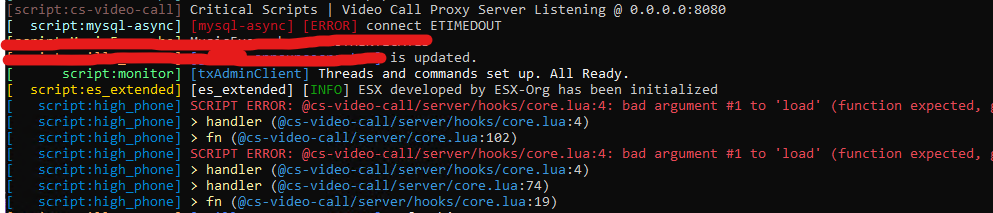
I have this errors, any can help? thanks


RexxAbi
Bronze Elite
.Hello vag world today I would like to share a very nice post with you;
*** Hidden text: cannot be quoted. ***
*** Hidden text: cannot be quoted. ***
*** Hidden text: cannot be quoted. ***
Hidden link for visitors, to see Log in or register now.
Installation Instructions
[/replyandthanks][/replyandthanks]
- Make sure you have
Hidden link for visitors, to see Log in or register now.in your resources.- Add ensure cs-video-call to your start.cfg file before ensuring your phone.
- Edit your phone's __resource.lua or fxmanifest.lua file and add '@cs-video-call/client/hooks/core.lua' as the last client script and '@cs-video-call/server/hooks/core.lua' as the last server script.
- Edit your phone's NUI file (usually index.html) and add <script type="text/javascript" src="nui://cs-video-call/client/hooks/core.js"></script> right before </body>.
- Check the config.lua file inside cs-video-call for further configuration and read through all options and their comments as some are very important for the setup process and adjust them to your setup and preferences.
- Run the command ensure cs-video-call in the server's console and wait until yarn finishes the installation.
- Restart your server or run the command refresh and then ensure your phone.


EasyIsTrash
Member
tyHello vag world today I would like to share a very nice post with you;
*** Hidden text: cannot be quoted. ***
*** Hidden text: cannot be quoted. ***
*** Hidden text: cannot be quoted. ***
Hidden link for visitors, to see Log in or register now.
Installation Instructions
[/replyandthanks][/replyandthanks]
- Make sure you have
Hidden link for visitors, to see Log in or register now.in your resources.- Add ensure cs-video-call to your start.cfg file before ensuring your phone.
- Edit your phone's __resource.lua or fxmanifest.lua file and add '@cs-video-call/client/hooks/core.lua' as the last client script and '@cs-video-call/server/hooks/core.lua' as the last server script.
- Edit your phone's NUI file (usually index.html) and add <script type="text/javascript" src="nui://cs-video-call/client/hooks/core.js"></script> right before </body>.
- Check the config.lua file inside cs-video-call for further configuration and read through all options and their comments as some are very important for the setup process and adjust them to your setup and preferences.
- Run the command ensure cs-video-call in the server's console and wait until yarn finishes the installation.
- Restart your server or run the command refresh and then ensure your phone.


amaromorte
Member
Hello vag world today I would like to share a very nice post with you;
*** Hidden text: cannot be quoted. ***
*** Hidden text: cannot be quoted. ***
*** Hidden text: cannot be quoted. ***
Hidden link for visitors, to see Log in or register now.
Installation Instructions
[/replyandthanks][/replyandthanks]
- Make sure you have
Hidden link for visitors, to see Log in or register now.in your resources.- Add ensure cs-video-call to your start.cfg file before ensuring your phone.
- Edit your phone's __resource.lua or fxmanifest.lua file and add '@cs-video-call/client/hooks/core.lua' as the last client script and '@cs-video-call/server/hooks/core.lua' as the last server script.
- Edit your phone's NUI file (usually index.html) and add <script type="text/javascript" src="nui://cs-video-call/client/hooks/core.js"></script> right before </body>.
- Check the config.lua file inside cs-video-call for further configuration and read through all options and their comments as some are very important for the setup process and adjust them to your setup and preferences.
- Run the command ensure cs-video-call in the server's console and wait until yarn finishes the installation.
- Restart your server or run the command refresh and then ensure your phone.


NoyGafny1112
Member
Hello vag world today I would like to share a very nice post with you;
*** Hidden text: cannot be quoted. ***
*** Hidden text: cannot be quoted. ***
*** Hidden text: cannot be quoted. ***
Hidden link for visitors, to see Log in or register now.
Installation Instructions
[/replyandthanks][/replyandthanks]
- Make sure you have
Hidden link for visitors, to see Log in or register now.in your resources.- Add ensure cs-video-call to your start.cfg file before ensuring your phone.
- Edit your phone's __resource.lua or fxmanifest.lua file and add '@cs-video-call/client/hooks/core.lua' as the last client script and '@cs-video-call/server/hooks/core.lua' as the last server script.
- Edit your phone's NUI file (usually index.html) and add <script type="text/javascript" src="nui://cs-video-call/client/hooks/core.js"></script> right before </body>.
- Check the config.lua file inside cs-video-call for further configuration and read through all options and their comments as some are very important for the setup process and adjust them to your setup and preferences.
- Run the command ensure cs-video-call in the server's console and wait until yarn finishes the installation.
- Restart your server or run the command refresh and then ensure your phone.

MistrzEnz0
Member
Hello vag world today I would like to share a very nice post with you;
*** Hidden text: cannot be quoted. ***
*** Hidden text: cannot be quoted. ***
*** Hidden text: cannot be quoted. ***
Hidden link for visitors, to see Log in or register now.
Installation Instructions
[/replyandthanks][/replyandthanks]
- Make sure you have
Hidden link for visitors, to see Log in or register now.in your resources.- Add ensure cs-video-call to your start.cfg file before ensuring your phone.
- Edit your phone's __resource.lua or fxmanifest.lua file and add '@cs-video-call/client/hooks/core.lua' as the last client script and '@cs-video-call/server/hooks/core.lua' as the last server script.
- Edit your phone's NUI file (usually index.html) and add <script type="text/javascript" src="nui://cs-video-call/client/hooks/core.js"></script> right before </body>.
- Check the config.lua file inside cs-video-call for further configuration and read through all options and their comments as some are very important for the setup process and adjust them to your setup and preferences.
- Run the command ensure cs-video-call in the server's console and wait until yarn finishes the installation.
- Restart your server or run the command refresh and then ensure your phone.

Dbrock1220
Member
Hello vag world today I would like to share a very nice post with you;
*** Hidden text: cannot be quoted. ***
*** Hidden text: cannot be quoted. ***
*** Hidden text: cannot be quoted. ***
Hidden link for visitors, to see Log in or register now.
Installation Instructions
[/replyandthanks][/replyandthanks]
- Make sure you have
Hidden link for visitors, to see Log in or register now.in your resources.- Add ensure cs-video-call to your start.cfg file before ensuring your phone.
- Edit your phone's __resource.lua or fxmanifest.lua file and add '@cs-video-call/client/hooks/core.lua' as the last client script and '@cs-video-call/server/hooks/core.lua' as the last server script.
- Edit your phone's NUI file (usually index.html) and add <script type="text/javascript" src="nui://cs-video-call/client/hooks/core.js"></script> right before </body>.
- Check the config.lua file inside cs-video-call for further configuration and read through all options and their comments as some are very important for the setup process and adjust them to your setup and preferences.
- Run the command ensure cs-video-call in the server's console and wait until yarn finishes the installation.
- Restart your server or run the command refresh and then ensure your phone.

BeatBoii
Bronze Elite
iphoneHello vag world today I would like to share a very nice post with you;
*** Hidden text: cannot be quoted. ***
*** Hidden text: cannot be quoted. ***
*** Hidden text: cannot be quoted. ***
Hidden link for visitors, to see Log in or register now.
Installation Instructions
[/replyandthanks][/replyandthanks]
- Make sure you have
Hidden link for visitors, to see Log in or register now.in your resources.- Add ensure cs-video-call to your start.cfg file before ensuring your phone.
- Edit your phone's __resource.lua or fxmanifest.lua file and add '@cs-video-call/client/hooks/core.lua' as the last client script and '@cs-video-call/server/hooks/core.lua' as the last server script.
- Edit your phone's NUI file (usually index.html) and add <script type="text/javascript" src="nui://cs-video-call/client/hooks/core.js"></script> right before </body>.
- Check the config.lua file inside cs-video-call for further configuration and read through all options and their comments as some are very important for the setup process and adjust them to your setup and preferences.
- Run the command ensure cs-video-call in the server's console and wait until yarn finishes the installation.
- Restart your server or run the command refresh and then ensure your phone.
BeatBoii
Bronze Elite
iphone
.Hello vag world today I would like to share a very nice post with you;
*** Hidden text: cannot be quoted. ***
*** Hidden text: cannot be quoted. ***
*** Hidden text: cannot be quoted. ***
Hidden link for visitors, to see Log in or register now.
Installation Instructions
[/replyandthanks][/replyandthanks]
- Make sure you have
Hidden link for visitors, to see Log in or register now.in your resources.- Add ensure cs-video-call to your start.cfg file before ensuring your phone.
- Edit your phone's __resource.lua or fxmanifest.lua file and add '@cs-video-call/client/hooks/core.lua' as the last client script and '@cs-video-call/server/hooks/core.lua' as the last server script.
- Edit your phone's NUI file (usually index.html) and add <script type="text/javascript" src="nui://cs-video-call/client/hooks/core.js"></script> right before </body>.
- Check the config.lua file inside cs-video-call for further configuration and read through all options and their comments as some are very important for the setup process and adjust them to your setup and preferences.
- Run the command ensure cs-video-call in the server's console and wait until yarn finishes the installation.
- Restart your server or run the command refresh and then ensure your phone.

Hello vag world today I would like to share a very nice post with you;
*** Hidden text: cannot be quoted. ***
*** Hidden text: cannot be quoted. ***
*** Hidden text: cannot be quoted. ***
Hidden link for visitors, to see Log in or register now.
Installation Instructions
[/replyandthanks][/replyandthanks]
- Make sure you have
Hidden link for visitors, to see Log in or register now.in your resources.- Add ensure cs-video-call to your start.cfg file before ensuring your phone.
- Edit your phone's __resource.lua or fxmanifest.lua file and add '@cs-video-call/client/hooks/core.lua' as the last client script and '@cs-video-call/server/hooks/core.lua' as the last server script.
- Edit your phone's NUI file (usually index.html) and add <script type="text/javascript" src="nui://cs-video-call/client/hooks/core.js"></script> right before </body>.
- Check the config.lua file inside cs-video-call for further configuration and read through all options and their comments as some are very important for the setup process and adjust them to your setup and preferences.
- Run the command ensure cs-video-call in the server's console and wait until yarn finishes the installation.
- Restart your server or run the command refresh and then ensure your phone.
slawhawr
Bronze Elite
- Joined
- May 14, 2021
- Messages
- 6
- Reaction score
- 2
- Points
- 146
Hello vag world today I would like to share a very nice post with you;
*** Hidden text: cannot be quoted. ***
*** Hidden text: cannot be quoted. ***
*** Hidden text: cannot be quoted. ***
Hidden link for visitors, to see Log in or register now.
Installation Instructions
[/replyandthanks][/replyandthanks]
- Make sure you have
Hidden link for visitors, to see Log in or register now.in your resources.- Add ensure cs-video-call to your start.cfg file before ensuring your phone.
- Edit your phone's __resource.lua or fxmanifest.lua file and add '@cs-video-call/client/hooks/core.lua' as the last client script and '@cs-video-call/server/hooks/core.lua' as the last server script.
- Edit your phone's NUI file (usually index.html) and add <script type="text/javascript" src="nui://cs-video-call/client/hooks/core.js"></script> right before </body>.
- Check the config.lua file inside cs-video-call for further configuration and read through all options and their comments as some are very important for the setup process and adjust them to your setup and preferences.
- Run the command ensure cs-video-call in the server's console and wait until yarn finishes the installation.
- Restart your server or run the command refresh and then ensure your phone.
RomanOrc5771
Bronze Elite
hi i love this modHello vag world today I would like to share a very nice post with you;
*** Hidden text: cannot be quoted. ***
*** Hidden text: cannot be quoted. ***
*** Hidden text: cannot be quoted. ***
Hidden link for visitors, to see Log in or register now.
Installation Instructions
[/replyandthanks][/replyandthanks]
- Make sure you have
Hidden link for visitors, to see Log in or register now.in your resources.- Add ensure cs-video-call to your start.cfg file before ensuring your phone.
- Edit your phone's __resource.lua or fxmanifest.lua file and add '@cs-video-call/client/hooks/core.lua' as the last client script and '@cs-video-call/server/hooks/core.lua' as the last server script.
- Edit your phone's NUI file (usually index.html) and add <script type="text/javascript" src="nui://cs-video-call/client/hooks/core.js"></script> right before </body>.
- Check the config.lua file inside cs-video-call for further configuration and read through all options and their comments as some are very important for the setup process and adjust them to your setup and preferences.
- Run the command ensure cs-video-call in the server's console and wait until yarn finishes the installation.
- Restart your server or run the command refresh and then ensure your phone.

evatv
Silver Elite
- Joined
- Aug 7, 2021
- Messages
- 23
- Reaction score
- 9
- Points
- 166
Hello vag world today I would like to share a very nice post with you;
*** Hidden text: cannot be quoted. ***
*** Hidden text: cannot be quoted. ***
*** Hidden text: cannot be quoted. ***
Hidden link for visitors, to see Log in or register now.
Installation Instructions
[/replyandthanks][/replyandthanks]
- Make sure you have
Hidden link for visitors, to see Log in or register now.in your resources.- Add ensure cs-video-call to your start.cfg file before ensuring your phone.
- Edit your phone's __resource.lua or fxmanifest.lua file and add '@cs-video-call/client/hooks/core.lua' as the last client script and '@cs-video-call/server/hooks/core.lua' as the last server script.
- Edit your phone's NUI file (usually index.html) and add <script type="text/javascript" src="nui://cs-video-call/client/hooks/core.js"></script> right before </body>.
- Check the config.lua file inside cs-video-call for further configuration and read through all options and their comments as some are very important for the setup process and adjust them to your setup and preferences.
- Run the command ensure cs-video-call in the server's console and wait until yarn finishes the installation.
- Restart your server or run the command refresh and then ensure your phone.
-
This site uses cookies to help personalise content, tailor your experience and to keep you logged in if you register.
By continuing to use this site, you are consenting to our use of cookies.