Hidden link for visitors, to see
Log in or register now.
Hidden link for visitors, to see
Log in or register now.
 0LAG Player Dashboard
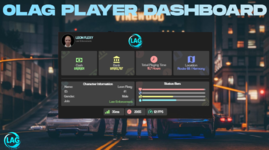
Elevate your server’s professionalism with a high-performance, centralized management suite for your players.The 0LAG Player Dashboard provides a seamless, modern aesthetic hub where players can track their vital stats, financial status, and character identity in one beautifully optimized interface.
 Key Features
 Live Character Identity
Give your players a detailed overview of who they are in the city.- Identity Tracking: Displays Character Name, Job, Grade, and Gender directly from your framework's database.
- Dynamic Mugshot: Features a live-rendered avatar of the player's actual in-game face.
- Playtime Tracker: Automatically tracks and displays the total hours spent on the server.
 Real-Time Economy & Performance
Keep track of finances and system health without opening multiple menus.- Financial Overview: Instant visibility of Cash and Bank balances with localized currency formatting.
- Live System Stats: Built-in FPS and Ping (MS) trackers to help players monitor their connection and performance.
- Location Tracking: Displays the player's current zone/street name dynamically as they move.
 Advanced Status Monitoring
A sleek, visual way to monitor the character's physical condition.- Dynamic Status Bars: Real-time percentage bars for Health, Armor, Hunger, and Thirst.
- Framework Integration: Pre-configured to sync with esx_status or QBCore's built-in status systems.
- Fluid UI: Features a smooth "fade-in and scale" opening animation for a premium feel.
 Intelligent Performance (0LAG)
- Zero Latency NUI: Built with Vanilla JavaScript and optimized CSS3 transitions—no heavy frameworks involved.
- Efficient Syncing: Data is fetched via server callbacks only when needed, keeping network usage at a minimum.
- Resmon: Runs at 0.00ms when closed and maintains peak efficiency while open.
 Technical Specifications
- Framework: Full support for ESX and QBCore via a unified utility bridge.
- UI Stack: HTML5, CSS3 (Coolvetica Font), Vanilla JS.
- Localization: Easy translation via a dedicated locale file (English & Turkish ready).
- Control: Triggered via a simple console command or custom keybind.
 How to Use
- Type the command (Default: /playerdashboard) to toggle the hub.
- View your character's live data, from money to total playtime.
- Monitor your FPS and Ping to ensure the best gaming experience.
- Press ESC or the "X" button to close the dashboard instantly.