


Hospital Medical Panel System
Medisys is a lightweight hospital control panel for FiveM servers that brings core healthcare workflows into one clean, fast UI. Create appointments, track active admissions, and find patients to open rich profiles in seconds. The live dashboard updates today’s appointments and inpatient count, with a donut chart for a quick daily snapshot. Patient profiles include tabs for Summary, Vitals, Medications, Allergies, Orders, and Notes so staff can view and update what matters without digging through menus. Lab and Imaging requests follow a clear Ordered → Processing → Ready flow, with editable results when needed. The Reports area lets you compose structured reports (title, body, meds, allergies) and review recent entries at a glance.
Preview Video:
Buy on Tebex:
Discord:
All-in-One Hospital Panel
Clean, modern interface that feels great to use.
Opens fast in-game and keeps everything in one place.
Live Dashboard
“Today’s Appointments” and “Inpatients” counters update instantly.
Daily donut chart shows the same totals at a glance.
“Latest Appointments” list with quick status change.
Appointments
Create appointments in seconds (date, patient, clinic).
Newly added appointments appear on the dashboard immediately.
Simple status options: Planned, Delayed, Canceled.
Admissions
See all active inpatients with search and ward filter.
Admit new patients, change ward/bed, or discharge with a clear history.
Ward names shown in your language.
Patient Profiles
Search by name or CitizenID and open a full profile.
Tabs for Summary, Vitals, Meds, Allergies, Orders, Notes.
Add vitals and notes quickly; review recent actions.
Lab & Imaging Orders
Create and track Lab or Imaging requests.
Easy status flow: Ordered → Processing → Ready.
View and edit results when they’re ready.
Reports
Write patient reports with title, body, meds, and allergies.
See the latest reports for quick review.
In-Game Screenshots


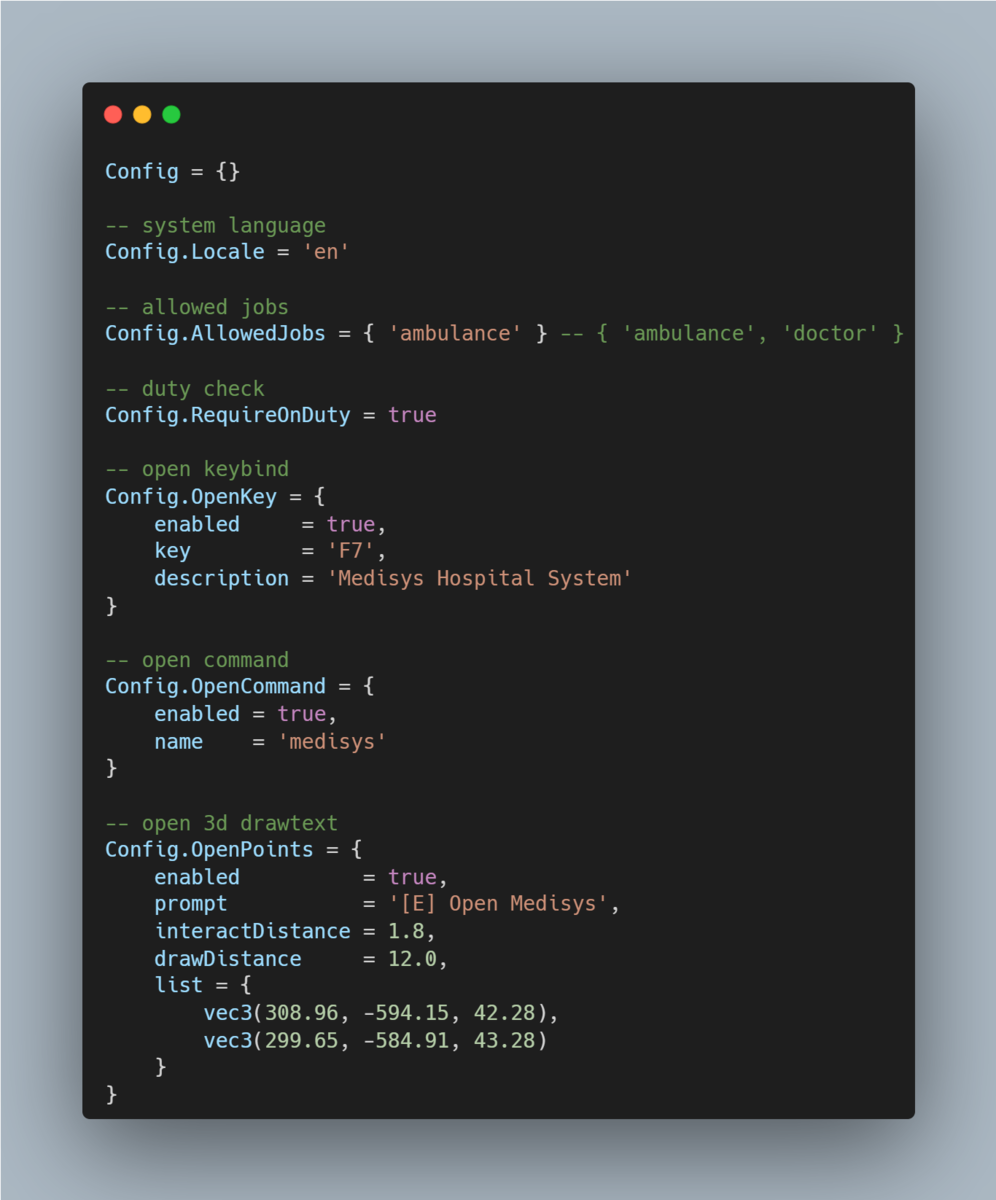
Config
Medisys is a lightweight hospital control panel for FiveM servers that brings core healthcare workflows into one clean, fast UI. Create appointments, track active admissions, and find patients to open rich profiles in seconds. The live dashboard updates today’s appointments and inpatient count, with a donut chart for a quick daily snapshot. Patient profiles include tabs for Summary, Vitals, Medications, Allergies, Orders, and Notes so staff can view and update what matters without digging through menus. Lab and Imaging requests follow a clear Ordered → Processing → Ready flow, with editable results when needed. The Reports area lets you compose structured reports (title, body, meds, allergies) and review recent entries at a glance.
Preview Video:
Hidden link for visitors, to see
Log in or register now.
Discord:
Hidden link for visitors, to see
Log in or register now.
All-in-One Hospital Panel
Clean, modern interface that feels great to use.
Opens fast in-game and keeps everything in one place.
Live Dashboard
“Today’s Appointments” and “Inpatients” counters update instantly.
Daily donut chart shows the same totals at a glance.
“Latest Appointments” list with quick status change.
Appointments
Create appointments in seconds (date, patient, clinic).
Newly added appointments appear on the dashboard immediately.
Simple status options: Planned, Delayed, Canceled.
Admissions
See all active inpatients with search and ward filter.
Admit new patients, change ward/bed, or discharge with a clear history.
Ward names shown in your language.
Patient Profiles
Search by name or CitizenID and open a full profile.
Tabs for Summary, Vitals, Meds, Allergies, Orders, Notes.
Add vitals and notes quickly; review recent actions.
Lab & Imaging Orders
Create and track Lab or Imaging requests.
Easy status flow: Ordered → Processing → Ready.
View and edit results when they’re ready.
Reports
Write patient reports with title, body, meds, and allergies.
See the latest reports for quick review.
In-Game Screenshots
Config
Last edited: