


OB-MDT is a modern, comprehensive, and customizable police management system developed for FiveM servers.
It allows police departments to manage citizen searches, personnel, incident reports, criminal records, penal codes, and departmental operations through a single modern interface.
With four different theme options, multilingual support, department-specific logo customization, and rank-based permission controls, OB-MDT provides roleplay servers with a more professional and organized law enforcement management experience.
OB-MDT is not just a police tablet. It is a complete management panel designed to centralize departmental operations.
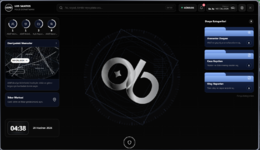
The OB-MDT dashboard is designed to provide quick access to important information within the police department.
The dashboard can display:
Police officers can perform detailed searches on registered citizens.
Police officers working within the department can be viewed and managed through OB-MDT.
Police personnel currently on duty can be viewed through OB-MDT.
Police officers can create detailed reports about incidents.
Criminal records can be created for citizens and suspects.
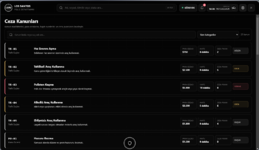
Server-specific penal codes can be viewed and managed through OB-MDT.
OB-MDT includes a customizable structure for servers with multiple police departments.
Critical actions can be restricted according to user rank and permission level.
Configurable permissions may include:
Records within OB-MDT can be found quickly using advanced search and filtering options.
OB-MDT includes a flexible language system suitable for international FiveM servers.
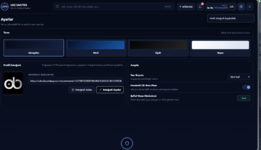
OB-MDT includes four different interface themes.
Users or server administrators can select the theme that best matches the visual style of the server.
OB-MDT is designed to provide a clean user experience across different screen resolutions.
OB-MDT can be customized to match your server’s branding and structure.
User and interface preferences can be managed through the OB-MDT settings page.
Move the downloaded ob_mdt folder directly into your server’s resources directory.
Example folder structure:
resources/ob_mdt
You can import the SQL file using one of the following database management tools:
After completing the SQL installation, configure the config and locale files according to your framework, job names, ranks, and server structure.
Then add the following line to your server.cfg file:
ensure ob_mdt
Make sure the required framework, database resource, and other dependencies are started before ob_mdt.
Manage citizens, personnel, reports, criminal records, and penalties through one professional system with OB-MDT.
Give your server a modern, organized, and comprehensive police management experience.
Modern interface, advanced management features, and server-specific customization options in one package.
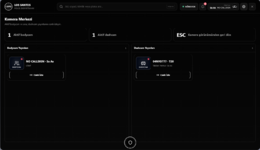
The Bodycam, Dashcam, Dispatch, and Camera Center modules are currently visible inside the OB-MDT interface.
Users can open and view these pages and systems inside the MDT. However, these features are not currently working in a fully stable or reliable manner.
The following systems are currently under maintenance and development:
Maintenance, compatibility, and development work on the Bodycam, Dashcam, Dispatch, and live camera systems is ongoing.
Once the required improvements are completed, fully working versions of these systems will be released through a future OB-MDT update.
Existing customers will be informed when the update is released.
It allows police departments to manage citizen searches, personnel, incident reports, criminal records, penal codes, and departmental operations through a single modern interface.
With four different theme options, multilingual support, department-specific logo customization, and rank-based permission controls, OB-MDT provides roleplay servers with a more professional and organized law enforcement management experience.
OB-MDT is not just a police tablet. It is a complete management panel designed to centralize departmental operations.
 Key Features
- Modern and responsive MDT interface
- Advanced dashboard
- Citizen search system
- Officer and personnel management
- Criminal record creation
- Incident report creation
- Penal code system
- Department-based personnel listing
- Active officer display
- Rank and permission system
- Advanced search and filtering
- Four different theme options
- Multilingual support
- Custom server logo and department name
- Easy-to-edit configuration
- Ready-to-use Turkish and English language support
 Advanced Dashboard
The OB-MDT dashboard is designed to provide quick access to important information within the police department.The dashboard can display:
- Active police officers
- Recently created reports
- Department information
- Authorized user information
- Active unit status
- Date and time information
- Quick-access menus
- Server or department logo
- Recent actions
- Important records
 Citizen Search System
Police officers can perform detailed searches on registered citizens.- Search citizens by first and last name
- View identity information
- Review citizen profiles
- View previous criminal records
- Review reports connected to a citizen
- View fine history
- View prison sentence records
- Create new actions for a citizen
- Fast search and filtering
 Officer and Personnel Management
Police officers working within the department can be viewed and managed through OB-MDT.- View officer names
- List rank information
- Separate personnel by department
- View duty status
- Separate active and inactive officers
- View officer profiles
- View unit information
- Permission-based access
- Search personnel
- Filter by department
- Custom server rank system
 Active Officer and Unit System
Police personnel currently on duty can be viewed through OB-MDT.- Officers currently on duty
- Active police count
- Officer name and rank
- Department information
- Unit information
- Duty status
- Active and inactive personnel separation
- Fast officer search
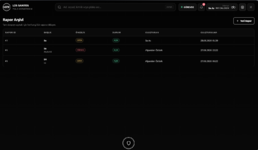
 Advanced Report System
Police officers can create detailed reports about incidents.- Create new incident reports
- Add report titles
- Write incident descriptions
- Add suspect information
- Link related citizens to reports
- Add involved officers
- Date and time information
- Set report status
- View previous reports
- Search and filter reports
- Department-based reporting
- View detailed report information
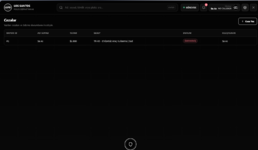
 Criminal Record Creation
Criminal records can be created for citizens and suspects.- Add a new criminal record
- Set the offense title
- Add an offense description
- Select the related citizen
- Set the monetary fine
- Set the prison sentence
- Record the responsible officer
- Date and time information
- View previous criminal records
- Citizen-specific criminal history
- Categorize offenses
- Select offenses from the penal code
 Penal Code System
Server-specific penal codes can be viewed and managed through OB-MDT.- Offense categories
- Offense names
- Offense descriptions
- Monetary fines
- Prison sentences
- Penalty points
- Category-based filtering
- Fast offense search
- Select penalties while creating reports
- Add penalties while creating criminal records
- Custom server penal code structure
 Department System
OB-MDT includes a customizable structure for servers with multiple police departments.- Separate personnel by department
- Custom department names
- Department-specific logos
- Department-specific ranks
- Department-based permissions
- Personnel filtering
- Unit-based configuration
- Custom server department structure
 Rank and Permission System
Critical actions can be restricted according to user rank and permission level.Configurable permissions may include:
- Creating reports
- Editing reports
- Adding criminal records
- Viewing citizen information
- Viewing personnel information
- Editing penal codes
- Department management
- Accessing settings
- Deleting records
- Administrative actions
 Advanced Search and Filtering
Records within OB-MDT can be found quickly using advanced search and filtering options.- Citizen search
- Officer search
- Report search
- Criminal record search
- Penal code search
- Filter by department
- Filter by rank
- Filter by date
- Filter by category
- Active and inactive status filters
 Multilingual Support
OB-MDT includes a flexible language system suitable for international FiveM servers.- Ready-to-use Turkish language support
- Ready-to-use English language support
- Structure suitable for adding more than 10 languages
- Easy-to-edit locale files
- Centralized interface text management
- Ability to add new languages
- Custom server translations
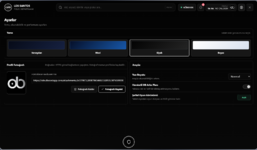
 Four Different Theme Options
OB-MDT includes four different interface themes.Users or server administrators can select the theme that best matches the visual style of the server.
- Four different themes
- Modern color options
- Dark interface structure
- Department-style appearance
- Responsive design
- Support for different screen resolutions
- Theme selection through settings
- User-friendly menu structure
 Modern and Responsive Design
OB-MDT is designed to provide a clean user experience across different screen resolutions.- Modern user interface
- Easy-to-understand menus
- Organized card layouts
- Responsive page design
- Fast page transitions
- Dark theme options
- Readable typography
- Professional police terminal appearance
 Server-Specific Customization
OB-MDT can be customized to match your server’s branding and structure.- Custom server logo
- Department-specific logo
- Custom police department name
- Custom server ranks
- Configurable permission levels
- Editable penal codes
- Theme selection
- Language selection
- Editable menu names
- Server-specific configuration
- Customizable departments
 Settings Page
User and interface preferences can be managed through the OB-MDT settings page.- Theme selection
- Language selection
- User preferences
- Appearance settings
- Department information
- Server logo
- Interface customization
 Installation
Move the downloaded ob_mdt folder directly into your server’s resources directory.Example folder structure:
resources/ob_mdt
SQL Installation
You must import the included .sql file into your server database.You can import the SQL file using one of the following database management tools:
- HeidiSQL
- phpMyAdmin
- DBeaver
- Navicat
- Similar MySQL or MariaDB management tools
After completing the SQL installation, configure the config and locale files according to your framework, job names, ranks, and server structure.
Then add the following line to your server.cfg file:
ensure ob_mdt
Make sure the required framework, database resource, and other dependencies are started before ob_mdt.
 General Requirements
- A working FiveM server
- A framework compatible with the script
- oxmysql or a compatible database connection
- The included SQL file imported into the database
- A configured police job
- A server-compatible rank and permission structure
 Why Choose OB-MDT?
- Comprehensive police management system
- Modern and professional interface
- Citizen search system
- Advanced reporting system
- Criminal record creation
- Penal code system
- Personnel and department management
- Active officer display
- Rank and permission controls
- Four different themes
- Multilingual infrastructure
- Custom server logo support
- Easy-to-edit structure
- Comprehensive features that improve the roleplay experience
Digitalize Your Police Department
Manage citizens, personnel, reports, criminal records, and penalties through one professional system with OB-MDT.Give your server a modern, organized, and comprehensive police management experience.
Modern interface, advanced management features, and server-specific customization options in one package.
 Bodycam, Dashcam, Dispatch, and Camera Center Notice
The Bodycam, Dashcam, Dispatch, and Camera Center modules are currently visible inside the OB-MDT interface.Users can open and view these pages and systems inside the MDT. However, these features are not currently working in a fully stable or reliable manner.
The following systems are currently under maintenance and development:
- Bodycam system
- Bodycam activation and deactivation
- Viewing active Bodycam feeds
- Dashcam system
- Installing and removing Dashcams from vehicles
- Viewing active Dashcam feeds
- Camera Center
- Live camera viewing system
- Dispatch integrations
- Transferring active alerts into the MDT
- Creating GPS routes to dispatch locations
Maintenance, compatibility, and development work on the Bodycam, Dashcam, Dispatch, and live camera systems is ongoing.
Once the required improvements are completed, fully working versions of these systems will be released through a future OB-MDT update.
Existing customers will be informed when the update is released.
omerbsrns
Modern, comprehensive, and customizable script solutions for FiveM servers.
Hidden link for visitors, to see
Log in or register now.
Attachments
-
 Ekran görüntüsü 2026-06-28 043658.png221.8 KB · Views: 24
 -
 Ekran görüntüsü 2026-06-28 043807.png433.5 KB · Views: 6
 -
 Ekran görüntüsü 2026-06-28 043813.png112.6 KB · Views: 6
 -
 Ekran görüntüsü 2026-06-28 043822.png100.1 KB · Views: 6
 -
 Ekran görüntüsü 2026-06-28 043828.png97.8 KB · Views: 6
 -
 Ekran görüntüsü 2026-06-28 043834.png168 KB · Views: 6
 -
 Ekran görüntüsü 2026-06-28 043839.png79.6 KB · Views: 6
 -
 Ekran görüntüsü 2026-06-28 043849.png174.5 KB · Views: 6
Last edited by a moderator: