


#  Advanced Mechanic & Gallery
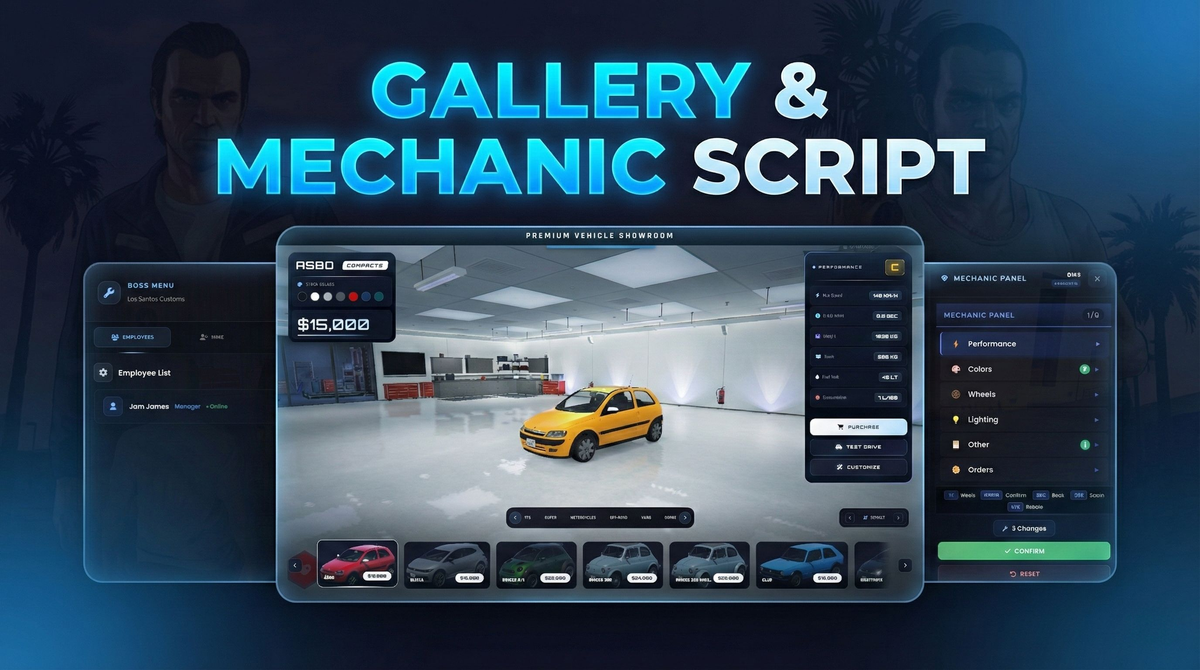
Modern, performance‑oriented and fully integrated **mechanic** + **vehicle gallery** system.
Built on top of **QBCore**, On the gallery side, advanced NUI UI, multi‑job mechanic support and gallery→mechanic order integration.
## Preview
---
# Links
# Preview:
# Tebex Bundle:
# Gallery:
# Mechanic:
---
## Overview
- **KOND Mechanic**
- Multi‑job mechanic system designed for QBCore
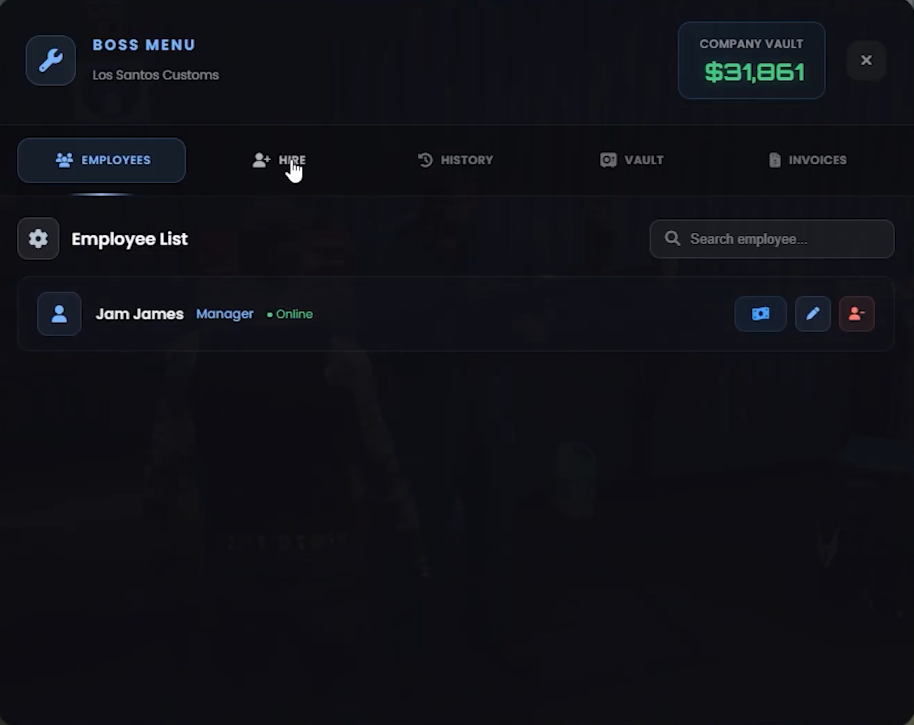
- Blips, boss menu, company vault, invoicing and modification history
- `ox_lib` zone system + `ox_target` integration
- Gallery integration: handles modification orders coming from KOND Gallery
- **KOND Gallery**
- Premium vehicle showroom system (QBCore with client‑side ESX detection)
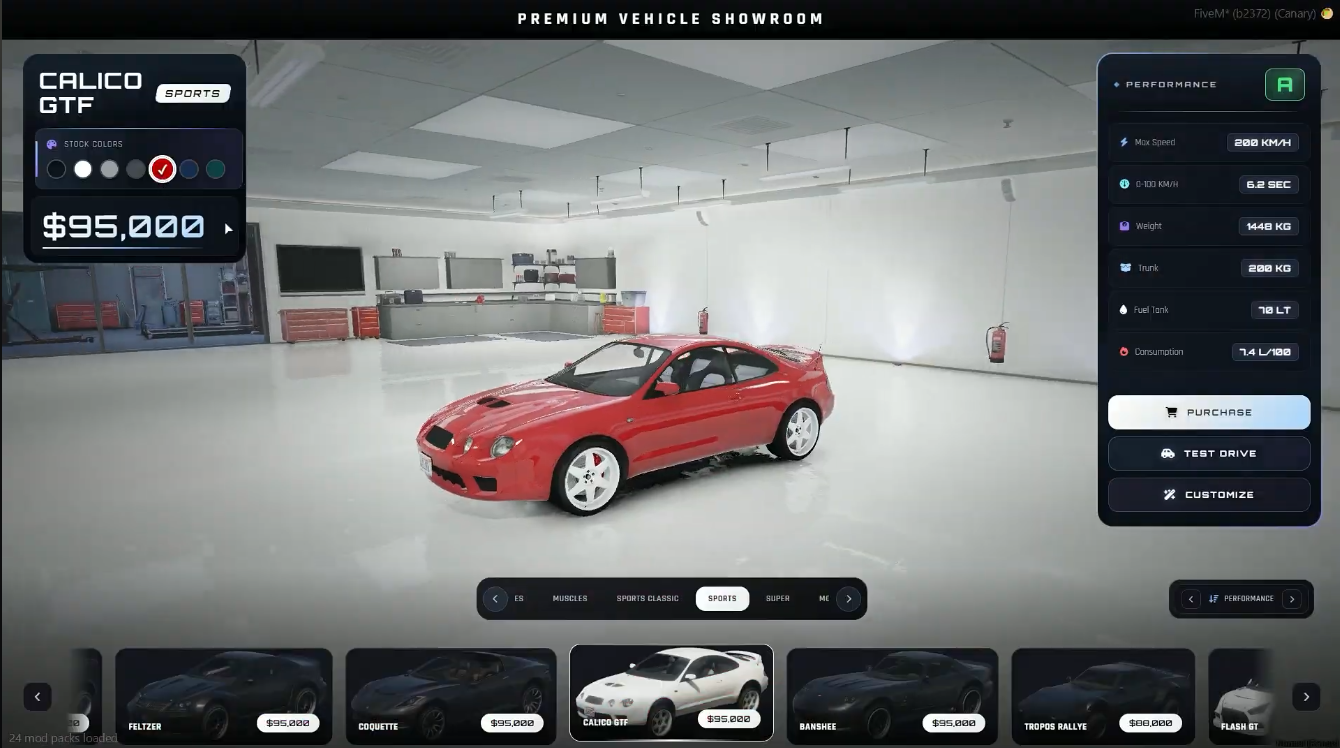
- In‑interior showroom, free camera, test drive, purchase and modification preview
- Online & local vehicle image support
- Sends chosen modifications as **orders** directly to KOND Mechanic when the vehicle is purchased
---
## Design & Architecture
### KOND Mechanic
- **Multi‑Job Structure**
- Single config handles multiple mechanic jobs via `Config.Jobs`:
- Example: `mechanic` (LS Customs), `mechanic2` (Benny's), `tuner` (Tuner Shop)
- Each job has its own:
- **company vault balance**
- **employees & salary settings**
- **blips, mechanic panels, boss NPC**
- **accessible modification types** (Normal / Bennys / Tuning / Arena / Extra)
- **Clean Client–Server Separation**
- `client.lua`:
- Framework integration via `QBCore = exports['qb-core']:GetCoreObject()`
- Job detection, boss NPC spawn, ox_lib spheres, mechanic panel NUI control
- Player interaction (E key, target, text UI)
- `server.lua`:
- All database tables, salary & vault & invoice management, saved mods
- Gallery order integration (`gallery_mod_orders`, `gallery_mod_history`)
- Anti‑exploit validation (job, grade, ownership, DB checks)
- **NUI / UI**
- Located under `html/`:
- `index.html`, `style.css`, `components.css`, `animations.css`, `script.js`
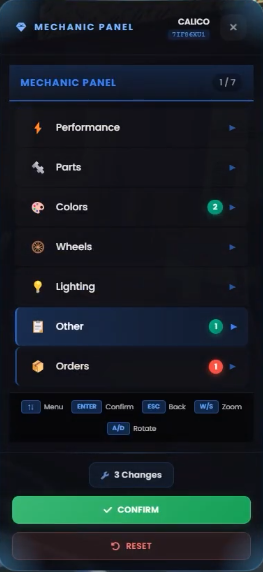
- Mechanic panel is inspired by GTA Online style, works without leaving the vehicle.
### KOND Gallery
- **Framework Detection**
- Client automatically detects framework on startup:
- Checks `qb-core` first, then `es_extended`
- Core logic is written for QBCore, with ESX support prepared on the client side.
- **Showroom & Camera System**
- Player is moved into a dedicated showroom interior:
- Configurable camera position, FOV, zoom and rotation
- Player is invisible, invincible and collision‑disabled (pure UI + camera control)
- When returning from a test drive, the last selected vehicle & mods are restored.
- **Gallery–Mechanic Integration**
- When buying a vehicle in the gallery with selected modifications:
- The vehicle is stored as **stock** in `player_vehicles`
- All chosen modifications are stored as a **mechanic order** in `gallery_mod_orders`
- Mechanics can later open these orders from KOND Mechanic and apply the mods.
## Gameplay Flow
**Player:**
- Goes to the gallery NPC → opens the **gallery UI** with E/target
- Browses categories, picks a vehicle, optionally configures modifications
- Chooses a payment method (cash/bank) and completes the purchase
- Receives the stock vehicle; modifications become a mechanic order.
**Mechanic:**
- Switches to a mechanic job defined in `Config.Jobs`
- Goes to the workshop and opens the mechanic panel / boss menu
- Applies modifications to vehicles, sends invoices, manages the vault
- Processes pending gallery orders and completes them for customers.
---
## Summary
- Modern, polished NUI with a complete mechanic + premium gallery ecosystem
- QBCore‑focused, with multi‑job support and safe server‑side validation
- Tight integration between gallery purchases and mechanic modification workflows
Everything is configurable via the included `config.lua` files so you can easily adapt the system to your server’s jobs, locations and economy.
# Links
# Preview:
# Tebex Bundle:
# Gallery:
# Mechanic:
Advanced Mechanic & GalleryModern, performance‑oriented and fully integrated **mechanic** + **vehicle gallery** system.
Built on top of **QBCore**, On the gallery side, advanced NUI UI, multi‑job mechanic support and gallery→mechanic order integration.
## Preview
---
# Links
# Preview:
Hidden link for visitors, to see
Log in or register now.
# Tebex Bundle:
Hidden link for visitors, to see
Log in or register now.
# Gallery:
Hidden link for visitors, to see
Log in or register now.
# Mechanic:
Hidden link for visitors, to see
Log in or register now.
---
##
Overview- **KOND Mechanic**
- Multi‑job mechanic system designed for QBCore
- Blips, boss menu, company vault, invoicing and modification history
- `ox_lib` zone system + `ox_target` integration
- Gallery integration: handles modification orders coming from KOND Gallery
- **KOND Gallery**
- Premium vehicle showroom system (QBCore with client‑side ESX detection)
- In‑interior showroom, free camera, test drive, purchase and modification preview
- Online & local vehicle image support
- Sends chosen modifications as **orders** directly to KOND Mechanic when the vehicle is purchased
---
##
Design & Architecture### KOND Mechanic
- **Multi‑Job Structure**
- Single config handles multiple mechanic jobs via `Config.Jobs`:
- Example: `mechanic` (LS Customs), `mechanic2` (Benny's), `tuner` (Tuner Shop)
- Each job has its own:
- **company vault balance**
- **employees & salary settings**
- **blips, mechanic panels, boss NPC**
- **accessible modification types** (Normal / Bennys / Tuning / Arena / Extra)
- **Clean Client–Server Separation**
- `client.lua`:
- Framework integration via `QBCore = exports['qb-core']:GetCoreObject()`
- Job detection, boss NPC spawn, ox_lib spheres, mechanic panel NUI control
- Player interaction (E key, target, text UI)
- `server.lua`:
- All database tables, salary & vault & invoice management, saved mods
- Gallery order integration (`gallery_mod_orders`, `gallery_mod_history`)
- Anti‑exploit validation (job, grade, ownership, DB checks)
- **NUI / UI**
- Located under `html/`:
- `index.html`, `style.css`, `components.css`, `animations.css`, `script.js`
- Mechanic panel is inspired by GTA Online style, works without leaving the vehicle.
### KOND Gallery
- **Framework Detection**
- Client automatically detects framework on startup:
- Checks `qb-core` first, then `es_extended`
- Core logic is written for QBCore, with ESX support prepared on the client side.
- **Showroom & Camera System**
- Player is moved into a dedicated showroom interior:
- Configurable camera position, FOV, zoom and rotation
- Player is invisible, invincible and collision‑disabled (pure UI + camera control)
- When returning from a test drive, the last selected vehicle & mods are restored.
- **Gallery–Mechanic Integration**
- When buying a vehicle in the gallery with selected modifications:
- The vehicle is stored as **stock** in `player_vehicles`
- All chosen modifications are stored as a **mechanic order** in `gallery_mod_orders`
- Mechanics can later open these orders from KOND Mechanic and apply the mods.
##
Gameplay Flow**Player:**
- Goes to the gallery NPC → opens the **gallery UI** with E/target
- Browses categories, picks a vehicle, optionally configures modifications
- Chooses a payment method (cash/bank) and completes the purchase
- Receives the stock vehicle; modifications become a mechanic order.
**Mechanic:**
- Switches to a mechanic job defined in `Config.Jobs`
- Goes to the workshop and opens the mechanic panel / boss menu
- Applies modifications to vehicles, sends invoices, manages the vault
- Processes pending gallery orders and completes them for customers.
---
##
Summary- Modern, polished NUI with a complete mechanic + premium gallery ecosystem
- QBCore‑focused, with multi‑job support and safe server‑side validation
- Tight integration between gallery purchases and mechanic modification workflows
Everything is configurable via the included `config.lua` files so you can easily adapt the system to your server’s jobs, locations and economy.
# Links
# Preview:
Hidden link for visitors, to see
Log in or register now.
# Tebex Bundle:
Hidden link for visitors, to see
Log in or register now.
# Gallery:
Hidden link for visitors, to see
Log in or register now.
# Mechanic:
Hidden link for visitors, to see
Log in or register now.
Last edited: