


LastResort
Member

LASTRESORT LOADING SCREEN
A glass-panel loading screen with video, particles and live music
ESX · QBCore · Qbox · vRP · Standalone
━━━━━━━━━━━━━━━━━━━━━━━━━━━━━━━━━━━━━━━━
FREE
Version 2.1 · No dependencies · Everything configured from one
config.js
Hidden link for visitors, to see
Log in or register now.
━━━━━━━━━━━━━━━━━━━━━━━━━━━━━━━━━━━━━━━━
Preview
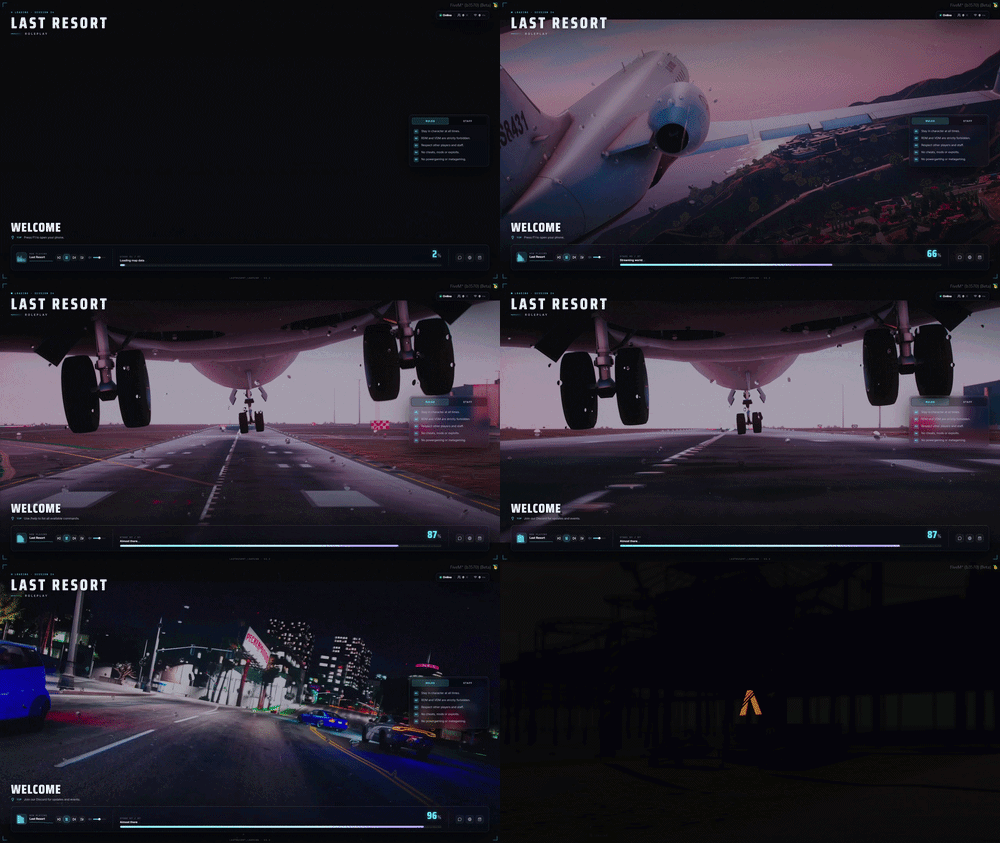
What it is
A modern loading screen built for FiveM servers of any size — configurable from a single
config.js, with no dependencies required.Video and image backgrounds, music, live server information, news, rules, staff, tips, framework integration and much more.
Features
- Local MP4 / WebM / MKV video backgrounds
- Image and slideshow backgrounds
- Automatic video fallback if a source cannot be played
- Music player with playlist, shuffle, loop and saved volume
- Real audio spectrum visualizer
- Live player count, max slots and ping
- Automatic player / character name
- Built-in News / Patch Notes
- Live tips
- Optional rules acceptance
- Rules, News and Staff tabs
- Animated loading progress
- Server logo and branding
- Configurable particles, patterns, blur, grain and scrim
- Social links
- Automatic framework detection
- Queue / whitelist support
- 10 included languages
- No dependencies
Version 2.1 — what changed
This update mainly focuses on better video support, more reliable connection data and improved compatibility with queues and whitelist systems.
Video improvements
MKV backgrounds are now properly supported.
.mkv, .m4v and .ogv files are included in the resource package, and MKV videos can be played directly when their codec is supported by FiveM CEF browser. If an MKV cannot be decoded, the loading screen can automatically continue to a matching WebM or MP4 fallback.Large or slow-loading videos no longer fail just because they take longer to download. Video playback errors now show the filename and media error code in F8, making broken or unsupported files much easier to identify.
Better queue / whitelist support
The handover system has been improved for servers where another resource controls the connection deferral. Servers using a queue, whitelist or other connection system can now receive the initial loading-screen data without LastResort Loading needing to take over the deferral.
Faster server information
Player information, server statistics, news and tips are now available earlier during connection. The loading screen retries initial information more aggressively, helping prevent placeholder or missing data when the UI first appears.
Automatic server name
If
brand.title is empty, the loading screen now automatically uses sv_projectName. A custom brand.title still takes priority.- Added a real audio spectrum visualizer and waveform
- Added a full music playlist / track selector
- Added live player count, max slots and ping
- Added News / Patch Notes and dynamic Tips
- Added an optional Rules acceptance system
- Added image and slideshow backgrounds
- Added server logo and expanded branding options
- Added automatic ESX / QBCore / Qbox / vRP integration
- Added smoother loading-screen shutdown and new events / exports
- Improved performance, accessibility and video/audio fallback handling
- MKV video support — with automatic WebM / MP4 fallback if needed
- Better video reliability — large or slow-loading videos no longer fail too early
- Improved queue and whitelist support
- Faster live server data — player count, max slots, server name and player information appear sooner
- News and tips load earlier
- Automatic server name from
sv_projectName - More reliable startup
Framework support
The resource automatically detects ESX, QBCore, Qbox and vRP. On standalone servers it falls back to the player FiveM display name. On supported frameworks, the welcome message can automatically switch to the player character name when it becomes available.
No additional bridge resource or snippets are required.
Languages
10 translations are included:
English · Hungarian · German · French · Italian · Spanish · Portuguese (BR) · Polish · Czech · Dutch
Custom languages can be added through a locale JSON file.
Installation
- Add
lastresort_loadingto yourresourcesfolder. - Add
ensure lastresort_loadingtoserver.cfg. - Add your video / image backgrounds and music.
- Configure
config.js. - Restart the server.
Only one resource can be used as the active FiveM loading screen. Disable your previous loadscreen resource before starting LastResort Loading.
Part of the LastResort suite
It occupies the
loadscreen slot and does nothing in-game after loading, so it runs alongside every other LastResort resource with no conflicts. It also exposes the moment the screen actually drops — IsLoadingScreenDone() and the lastresort_loading:finished event. Your own resources can use the same signal.Specs
| Price | Free |
| Code is accessible | Yes |
| Subscription-based | No |
| Requirements | None |
| Framework | Standalone / ESX / QBCore / Qbox / vRP |
| Support | Yes |
━━━━━━━━━━━━━━━━━━━━━━━━━━━━━━━━━━━━━━━━
FREE
Discord:
Website:
Support: [email protected]
━━━━━━━━━━━━━━━━━━━━━━━━━━━━━━━━━━━━━━━━
FREE
Hidden link for visitors, to see
Log in or register now.
Discord:
Hidden link for visitors, to see
Log in or register now.
Website:
Hidden link for visitors, to see
Log in or register now.
Support: [email protected]
━━━━━━━━━━━━━━━━━━━━━━━━━━━━━━━━━━━━━━━━